Category Archives: General

Articles about Amateur Radio and the Nashua Area Radio Society. This is a general category which includes most articles on our website.

Propagation Prediction Websites

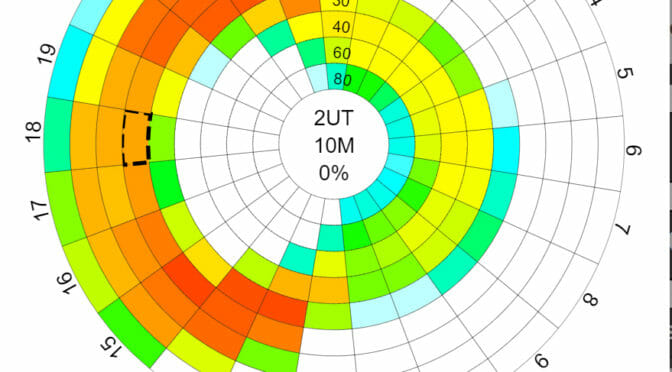
Is the 20-meter band open to the location of the latest DXpedition on the bands?   When is 6 meters open for Sporadic E?  Looking for a weak signal 2-meter contact with a specific grid square?  There are websites you can visit that give you a prediction of whether the band you are on is open to a given destination.

HF Propagation

N0NBH Propagation Widget

The simplest HF propagation prediction is the widget that is seen on many Amateur Radio Websites – QRZ.com, DXSummit.fi, and more.   This gives you a rough idea of what bands are open day and night. Data is based on the Sunspot Number, A and K indices, and other indices.  But this doesn’t take into account many factors like your location, the DX location, the characteristics of your station, and the DX station.  Just because 15m says Poor doesn’t mean you won’t hear anything on the band.

VOACAP – HF Propagation Prediction

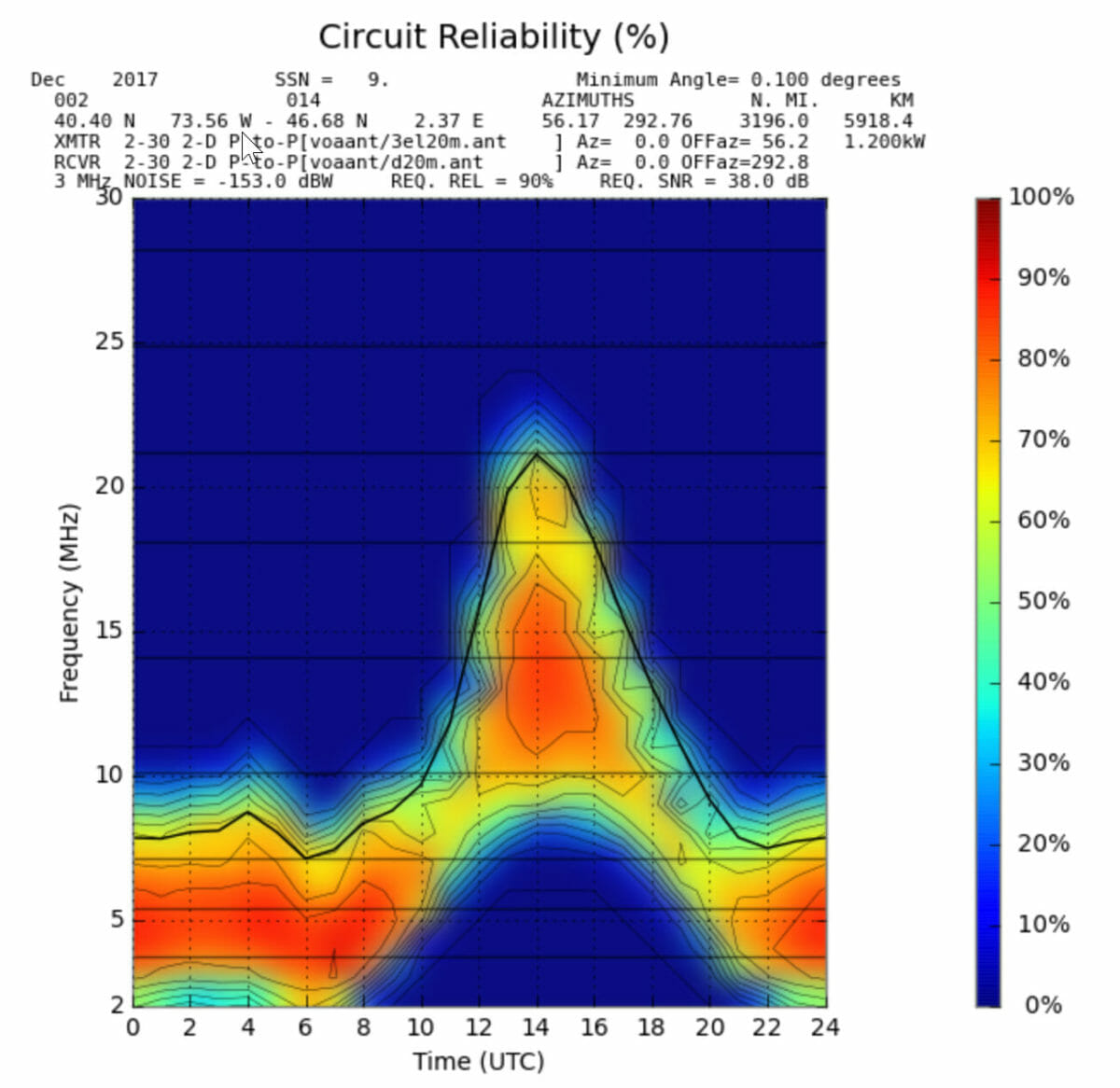
VOACAP Point to Point Prediction

VOACAP is the Voice of America Coverage Analysis Program and provides detailed information about HF propagation.  You can choose transmitter and receiver locations from many cities around the world.  It also provides choices of Antennas, Power, Mode, and more for each end of the contact. You can look at several different views of propagation.  If you spend some time delving into the details of propagation visit this site.

VOACAP prediction from DXSummit.fi

For a faster view of whether you will be able to contact a specific DX Station that is currently on the air,  the DXSummit.fi spotting website has incorporated propagation predictions on their website.  If you find a DX station spotted there that you contact, just right-click on the DX callsign and select VOACAP from the drop-down.   You just need to choose whether you are a Basic (100 watts and a Wire) or a Superstation (Amplifier and Directional Antenna).  You can also look at views of Short Path or Long Path.  It will give you a good view of when you need to be on which band to contact the DX station.

6 Meters – The Magic Band

DXMaps - 6 Meter Openings
DXMaps – 6 Meter Openings

The best website that I have found for 6 meters is DXMaps.com.  It provides a map view of the world or you can select a continent. Based on spotting network data, it shows 6-meter contacts and color codes them by Sporadic-E, Multihop ES, Meteor Scatter, etc…  even Aurora.  You can also get a view of 10 meters, 2 meters, or 70 cm.  If you sign up for a free account, you can subscribe to real-time notifications when there is an opening near you.

2 Meter Propagation

VHF Propagation Map
VHF Propagation Map

Looking for a tropo opening for a weak signal 2-meter contact?   Visit the website http://aprs.mountainlake.k12.mn.us/ to see a VHF Propagation map.  This shows tropo openings as color-coded clouds – with brighter colors for the longer openings.    This is based on APRS data.

These are the websites that I like to visit to understand the propagation forecast for the day.  If your favorite site is not on the list, add a comment so the rest of our readers can check it out.

Anita, AB1QB

Join Our Next Monthly Breakfast

We had our first monthly breakfast at Joey’s Diner in Amherst, NH on November 18th and a great time was had by all who attended.

Breakfast at Joey's Diner
Breakfast at Joey’s Diner

We will hold our Monthly Breakfast on the third Saturday or each month.  We’ll choose a different restaurant in a different location around the Nashua area each month.  Please contact Anita, AB1QB at [email protected] with restaurant recommendations.

Inside Parker's Maple Barn
Inside Parker’s Maple Barn

Our December breakfast will be held at Parker’s Maple Barn in Mason, NH on Saturday December 16th starting at 8:30am.  For Directions, see the Calendar.  We’d love to see you there!

Homebrew an Antenna Analyzer

If you’re like me, then you try to be judicious with your $$$. Ideally, it would be great to spend $ and get the highest quality in return. But, the world does not work this way. So, if I am going to spend $$$ (on a scale of $, $$, and $$$), I want to make sure not only am I obtaining quality, but also multi-functionality. In other words, it’s easier for me to spend more money when I feel like my purchase is not exactly a swiss-army knife but also not a one-trick pony.

I could be wrong, but antenna analyzers kind of feel like a one-trick pony to me. When I first strung up my Buckmaster 7-band OCF dipole, I borrowed the RigExpert AA-30 from Greg W1TEN, in order to measure the VSWR,  since I wasn’t thrilled about spending $200 for the analyzer. Especially because I would rather put that money towards a Heil headset and foot pedal (to be ordered for Xmas 2017).

At the October Board of Directors (BoD) meeting, Fred AB1OC mentioned that in the Nov 2017 issue of QST, there was an article entitled “Build Your Own Arduino-Based Antenna Analyzer” by Jack Purdum W8EEE and Farrukh Zia K2ZIA. The attractive thing about this design is the authors quote a price point of $50. The major components are comprised of an Arduino, AD9850 Direct-Digital Synthesizer (DDS) board, and TFT display. Additionally, on the main website, one can also download the associated software to load on the Arduino. So, this leaves the user with the experience and satisfaction of homebrewing a really useful component for the shack. There seems to be a lot of documentation on the assembly, parts, etc. so this makes it relatively easy for the user.

Homebrew Antenna Analyzer
Completed assembly of analyzer
Homebrew Antenna Analyzer
View of Arduino, PCB, and components for analyzer

A downside is that the number of components required seems to be somewhat large as seen from Farrukh’s website which could potentially be overwhelming if you are just beginning. The authors also quote that one helpful component is purchasing their own custom PCB for the job itself. Though this is not essential, it may aid in the build.

Having not built this yet, I would say this would be an intriguing build for someone. I would certainly like to tackle it and have added it near the top of my to-do list since it seems like it can be accomplished within a weekend.

A Cheaper Alternative?

After I read the article, I emailed Mike AB1YK to let him know about it. He replied with yet another option in the form of a PDF by K6BEZ who claims to accomplish the same feat in < $50. Definitely attractive! It’s built on the same premise: AD9850 DDS board, Arduino, etc., but seems to use fewer components. Instructions also seem to be located here. 

Some pitfalls of the build from the PDF link provided above:

  • I located some Yahoo forums discussing that the analyzer as spec’d out did not seem to work for some builders. It’s unclear if the schematics were incomplete or if it’s due to another reason entirely.
  • The build does not seem to be that much cheaper. For instance, the PDF lists the AD9850 DDS as being $4 on eBay. Having looked there myself, as well as on Amazon, the going rate seems to be in the neighborhood of $18-$19. Given this, along with looking up some of the other items in the bill of materials, the price point seems to approach $50 pretty quickly.

If I endeavor upon this, I will be sure to document and write another article about it. If someone attempts the “cheaper option”, I would be interested to hear how well it works.

Happy building!

Brian AB1ZO

Radio Amateurs Developing Skills Worldwide