Tag Archives: Homebrew

Astron SS-30M Power Supply Meter LED Retrofit

Introduction

The Astron SS-30M is a popular metered, switching power supply rated at 30 A. It is commonly used to power 100W radios.

In spite of a ubiquitous changeover to LED illumination, Astron persisted in using incandescent illumination in their power supply meters until a few years ago.

This article discusses the replacement of incandescent bulbs in power supply metering with LED illumination.

Caution. Before proceeding with any disassembly, verify that the line cord has been unplugged from the power supply, or from the wall outlet. There is no isolation transformer in these switching supplies, so it is particularly dangerous. The cover is fastened with Torx screws to prevent tampering.

Procedure

Upon opening an older Astron SS-30M [1] power supply, it was discovered that the meter scale backlighting bulbs could not be replaced without meter disassembly. That got me thinking about whether I could install my own incandescent bulbs or LEDs to replace what was inside the meter housings.

When I checked the Astron website, I found that retrofit circuit boards [2] to backlight these meters were being offered for $3 each. The boards come complete with integral, white, surface-mounted LEDs, integral dropping resistors, and wiring pigtails.  I immediately ordered two of them. This was a lot easier than retrofitting the old circuit boards with new LED bulbs and dropping resistors.

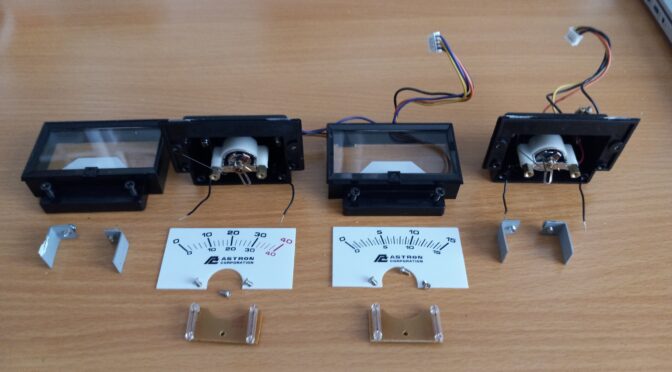
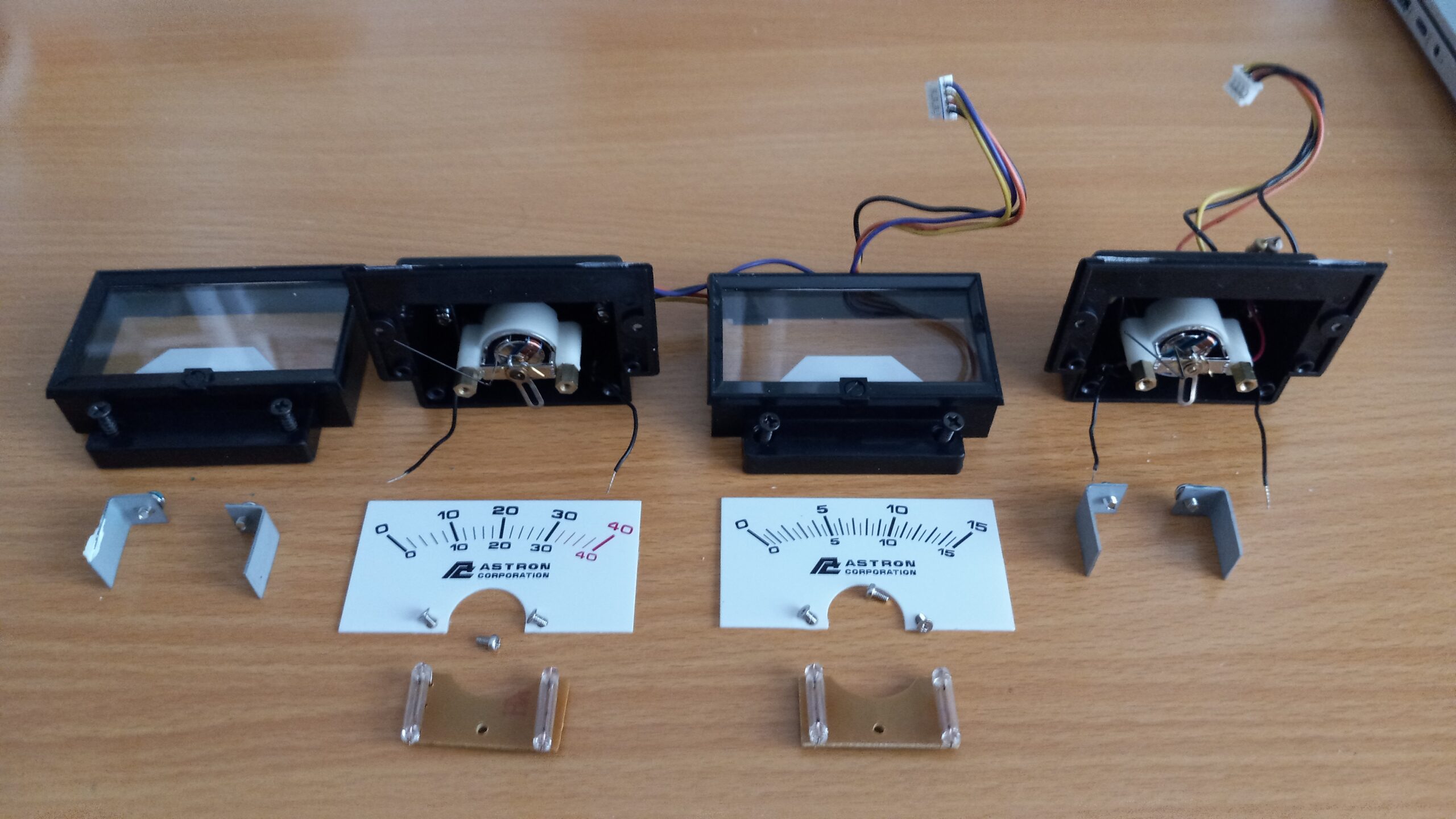
Meter disassembly is shown in Figure 1. The meters may be removed with their wiring harnesses and connectors intact. No desoldering is required to remove the meters from the next higher assembly. It is suggested that one of the harnesses and its mating connector be marked so that identification is easier during reassembly.

The meters are held to the power supply face with four spring clips (shown). These must be removed before the meters can be removed from the power supply face. Once the meters have been removed, the two screws that clamp each of the meters faces to the meter cases are removed (shown). Then, the meter faces may be swung upward to expose the meter movements. Care should be taken during this operation to remove any epoxy, RTV or plastic cement from the seam that holds the front face of the meter to the plastic meter housing. This may be done with a sharp blade. Once removed, each of the meter faces is set aside with its matching meter movement.

Figure 1. Astron SS-30M Power Supply Meter Disassembly. Take care when disassembling the meters so that the meter needles aren’t bent. Pair the meter scales with the correct meter movements. The current meter is to the left and the voltage meter is to the right. If an incorrect meter scale is paired with the wrong meter movement, one of the meter harnesses will not be long enough to reach the correct chassis connector.

The next step is to remove the meter scale. It is fastened to the meter movement with two small screws. I grasped both sides of the meter scale with one hand while removing these screws with a jeweler’s screwdriver to prevent the scale from moving and damaging the meter needle.  Once the meter scale has been removed, the internal meter movement and backlight bulbs are visible. The backlight bulb printed circuit board is held to the meter case with one small screw. This screw is removed with a jeweler’s screwdriver. Again, take care not to damage the meter needle.

Next, the printed circuit board is pulled up and away from the meter movement without touching the needle. Once out of the meter movement, the wires that power the board are snipped close to the old circuit board to leave the pigtails connected to the meter housing. The polarity of the lamp wiring is evident from the wire colors outside the meter case. In my supply, pink is used for the positive lead and black for the negative lead.

After stripping the insulation from the pigtails and tinning them, the new LED circuit boards were installed. A short length of very fine shrink tubing was slipped over each of the pigtails that had been soldered to the new circuit board at the factory. Next, the old pigtails were soldered to the new pigtails by paying close attention to the polarities. The pigtails on the retrofit are red and black.
Once soldered, the shrink tubing is slipped over each splice to prevent any chance of a short circuit between the meter circuit and the lighting circuit. Don’t heat gun the shrink tubing without protecting the meter movement. If the tubing is small enough, it may not be necessary to shrink the tubing at all.

Next, it was time to install the new circuit board in the rear meter housing. Care should be taken to protect the meter needle from the spliced leads when the board is installed with one screw. Once installed, any extra wire may be stuffed underneath the circuit board with a pair of long needle nose pliers.

Finally, the meter face is swung down over the rear meter housing, and the meter face is fastened to the rear meter housing with the original screws.

Once the meters have been reinstalled with the spring clips that hold the meters to the front panel, reconnect the meter wiring harnesses to the correct chassis connectors.

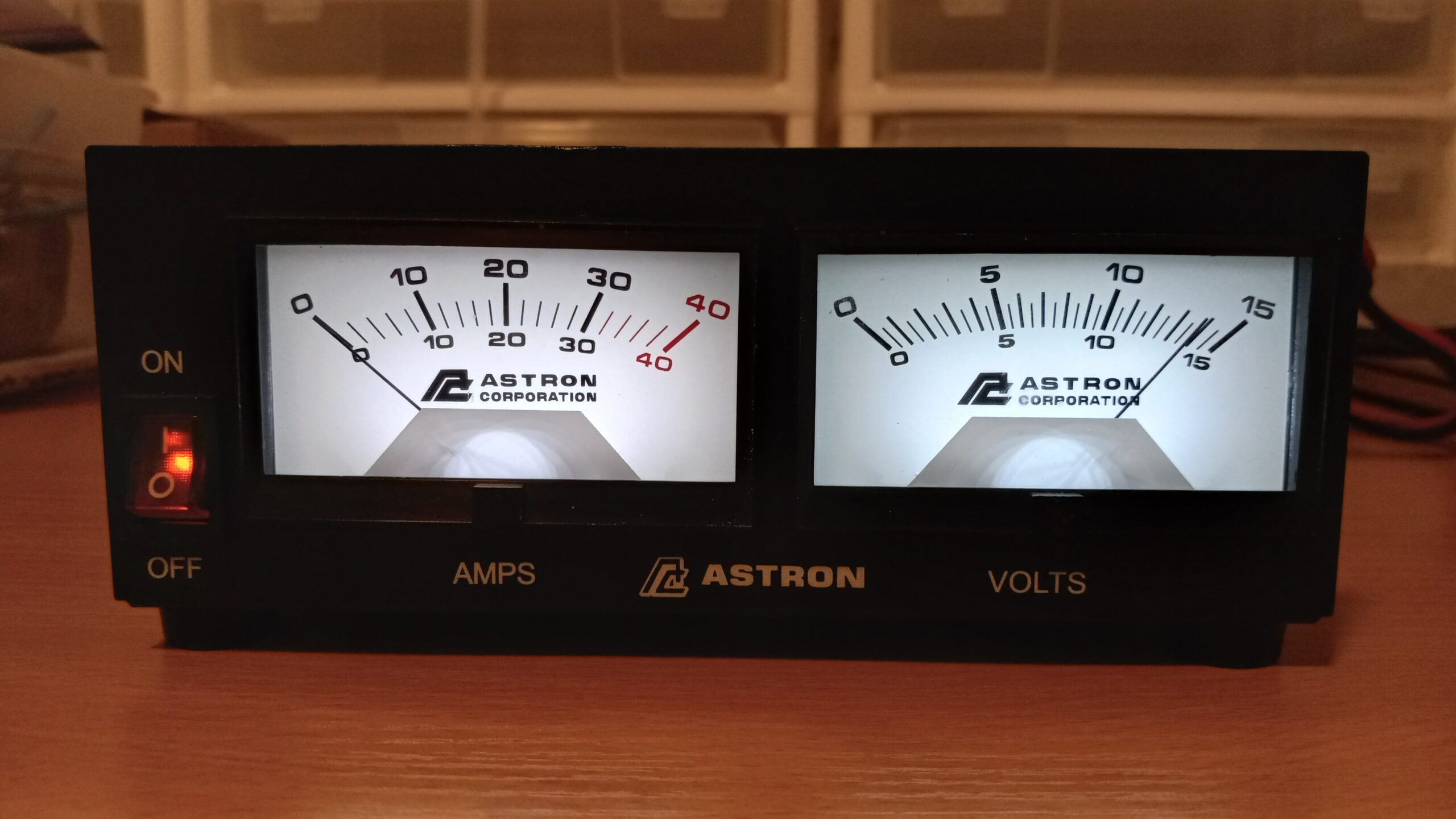
The next step is to fasten the top cover to the power supply with four Torx screws. Once closed up, an AC power cord may be connected and the supply may be powered up. If everything has been wired correctly and the wiring harnesses have been plugged into the correct sockets on the chassis, the meters should be illuminated with bright white light and the voltage meter should read what the supply was set to prior to disassembly. See Figure 2.

Figure 2. Astron SS-30M LED Meter Backlight Retrofit Completed. The OEM incandescent meter bulbs have been replaced with OEM LED bulbs supplied as a replacement part by Astron. It appears as though the left meter is illuminated by different color LEDs. That is not an artifact. When I checked my newer LED illuminated supply meters, the color and brightness were not a perfect match.

References:

[1] Astron Corporation, 9 Autry, Irvine, CA 92618. https://www.astroncorp.com/

[2] Ibid.  https://www.astroncorp.com/product-page/led-backlight-circuit-board

Control Your Rig Remotely With This USB-Controlled Power Station

Introduction

Remote station operation has become more popular now that several rig manufacturers offer accessories to enable the radio amateur to do so. However, there is usually a large expense associated with acquiring these accessories. For some, it may not be cost-effective to own them for occasional use. In this article, we describe a solution for remote operation from another room of your home, your yard, or while on travel. It is also convenient for controlling on/off functions in the shack with the click of the mouse. The solution revolves around a Velleman relay card that can control a number of relays from a computer desktop.

The Power Station

This article describes a USB-controlled AC power strip, Figure 1, that was built around the Velleman K8090 8-Channel Relay Board in kit-form [1]. Varistors were added to the board as a recommended option [2]. The board can also be purchased fully assembled [3].

Figure 1. USB Controlled Power Strip. Each 15A duplex outlet is under USB control. There are just enough contacts on the barrier strip for 8 relays, neutrals, and grounds.

The PC communicates to the board via USB. A free, desktop, graphical user interface (GUI) is provided by Velleman for use as test software, or you may opt to purchase an application such as N-Button Lite [4].

Some type of rig interface is required to control your rig and audio from a PC. You may use the interface in your rig if it has one, or buy or build one of your own.

In order to log onto your computer, see your desktop remotely and hear rig audio, some kind of conferencing software is required. I use TeamViewer [5] to see my desktop and hear computer audio remotely.

Cautionary Notes

You will be dealing with AC line voltage in this project. Keep the clear polycarbonate cover on the enclosure while AC power is applied. Since the Velleman card operates on 12 VDC and control is over USB, all testing can be completed prior to plugging the AC line cord into the wall socket.

The FCC requires some means to disable the transmitter within 3-minutes if something goes wrong during remote operation. Velleman makes a WMT1206 Universal Timer Module with USB Interface [6] that should prove useful for this application. Its relay can handle 8A of AC. There are also similar USB timer modules available on eBay. It’s also a good idea to have the ability to reboot your computer remotely. The exact details of how to implement this FCC requirement are left to the reader but there are plenty of suggestions to be found online.

Kit Construction

An experienced kit builder can assemble and test the board in an afternoon. The added varistors are specified at 125J, 300VAC, 385VDC, and 4500A clamping peak current [7]. If these are not readily available, there are equivalents. A suggestion was made to thicken the circuit board traces that must handle the 16A relay current with additional solder. I didn’t care for this approach and opted to solder bus wire onto these traces, instead. You might find it ludicrous to solder #14 AWG buss wire onto the board, so your other option is to derate the relay capabilities to what the conductors can safely handle since the PCB traces have not been rated. For example, the ampacity of #20 AWG buss wire is at least 5A (11A at 75°C) [8], and that will be good for 575W. None of the circuits that I run from this PCB require anywhere near 575W.  Take care not to damage the PCB traces while soldering. Excessive heat will lift the PCB traces.

Housing, Connectors, and AC Outlets

There are 8 duplex outlets in this project – each one under separate relay control. Each outlet has been wired with #14 AWG. Each relay is rated at 16A, resistive load (see the previous section for derating). The duplex outlets have been spaced far apart so that a variety of line cords and wall adapters will fit without interference. The control board is housed in a Bud Industries PN-1340-C polycarbonate enclosure [9] with a clear cover (not affixed), Figure 2. The clear cover provides visibility for the status lights on the PCB. Bud Industries also manufactures an internal aluminum panel, PNX-91440 [10], upon which the PCB and barrier strip have been mounted. Take care in locating connectors on the housing or the PCB will not fit. The PCB is fastened to the aluminum panel with 4-40 hex standoffs. The Bud Industries enclosure is fitted with 1/2-inch male terminal adapters [11] at either end. DC power for the relays enters the enclosure at the top left through a 2.1mm panel mount connector [12]. The relay power required is 12VDC at 400mA. A 12 VDC wall adapter with a 2.1mm plug can provide this voltage. AC power enters the housing through a cable gland at the lower left. Switchcraft makes the USB connector at the lower right. It converts USB A inside the enclosure to USB B on the outside. The connector was purchased from Newark [13]. The short USB jumper patch cord was purchased on Amazon [14]. A step drill [15] is the most effective way to bore the large holes in a polycarbonate or ABS case without cracking it.

Remote Control

Figure 2. Interior View of Control Board Enclosure. Eight 16A relays are visible. There’s not much space to spare. Take care in wiring the AC connections and in locating the connectors on the housing or the PCB will not fit.

Software Apps

The test software that is supplied by Velleman for the circuit card is adequate, or N-Button Lite [16] may be purchased Figure 3. A screenshot of the lower right corner of the monitor shows the buttons for N-Button Lite. The green buttons indicate that four of the eight relays are active. If you purchase the Bud enclosure with a clear polycarbonate cover as I did, you will be able to see all eight red indicator lights on the Velleman board, one for each relay. They will light when a relay becomes active.

Remote Control

Figure 3. Screenshot of PC desktop. N-Button Lite controls each of 8 relays.

References

References
[1] https://www.jameco.com/z/K8090-Velleman-8-Channel-USB-Relay-Card-Kit_2123952.html
[2] https://www.velleman.eu/products/spareparts/?code=vdr300
[3] https://www.amazon.com/Velleman-VM8090-8-Channel-Relay-Card/dp/B00CPCQ88Y
[4] https://www.serialporttool.com/GK/n-button-lite/
[5] https://www.teamviewer.com/en-us/?utm_source=google&utm_medium=cpc&utm_campaign=us|b|pr|19|jul|Brand-TeamViewer-Exact|free|t0|0|dl|g&utm_content=TeamViewer_Exact&utm_term=teamviewer&gclid=Cj0KCQjw5ZSWBhCVARIsALERCvzZflNoCfAiFgi9STEIDiJkCtRuazuukru
[6] https://whadda.com/product/universal-timer-module-with-usb-interface-wmt206/
[7] Velleman, op. cit. https://www.velleman.eu/products/spareparts/?code=vdr300
[8] https://en.wikipedia.org/wiki/American_wire_gauge
[9] https://www.budind.com/product/nema-ip-rated-boxes/pn-series-nema-box/ip65-nema-4x-box-with-clear-cover-pn-1340-c/ – group=series-products&external_dimension
[10] https://www.budind.com/accessories/aluminum-internal-panel-pnx-91440/
[11]https://www.homedepot.com/p/1-2-in-Male-Terminal-Adapter-R5140103/202043509
[12] https://www.amazon.com/2-1mm-DC-Power-Jack-Chassis/dp/B073PKZPQ7
[13] https://www.newark.com/switchcraft-conxall/ehusbbabxpkg/usb-adapter-type-b-rcpt-a-rcpt/dp/08N9043?gclid=Cj0KCQjw5ZSWBhCVARIsALERCvycmWj-i38ykHaPrlbG8Eb-uxCyxcpZzdNWmZ0r7Z2iV9zgd7CpVKAaAh5KEALw_wcB&mckv=_dc|pcrid||plid||kword||match||slid||product|
[14] https://www.amazon.com/inch-USB-2-0-Male-Cable/dp/B079ZP65SN?th=1
[15] https://www.homedepot.com/s/step%2520drill?NCNI-5
[16] Relay Pros, op. cit. https://www.serialporttool.com/GK/n-button-lite/

Tilt-Over Bases for Antenna Masts That You Can Build

Introduction

Most of us have installed temporary antenna masts and have looked for a way to raise, lower and guy the masts while working alone. This was the case when I wanted to raise three masts for temporary antenna testing. When I couldn’t find any tilt-over bases that were sturdy, I decided to design and build some of my own from readily available materials.

I wanted mast bases that were rugged and heavy, not thin and flimsy. I discovered that mild steel [1] with its high carbon content is easy to weld, so I settled on that material. I also found a source for mild steel hinges [2]. They were perfect matches for mild steel plate. (In case you prefer aluminum, heliarc welding has become routine. It all depends upon what the welder quotes for a price and how heavy you want the bases to be.)

A sketch of what was built appears in Figure 1. All of the dimensions are based upon available materials. The only cutting required was to fabricate a steel shim [3]. When the tilt-over base is in its upright position, this shim, which is the same thickness as the hinges, maintains the spacing between the steel plates.

tilt-over bases

Figure 1. Design Sketch. The small holes in the left base plate accommodate 3/8” spikes (see text). The steel tube is welded to the rear side of the right top plate (see text).

A local welder assembled three tilt-over base mounts from supplied 8″ x 8″ x 1/4″ mild steel plate, 3″ OD 11 gauge steel tube, 6″ x 6″ steel hinges, and 3/4″ x 3/4″ x 6″ steel bar stock. The steel plate, hinges and bar stock were ordered from Amazon, while the tubing [4] was ordered from Coremark. The ID of the base tube is 2.75″ (70mm), 11ga. This is a loose fit for the cap at the bottom of most fiberglass masts. I used felt blankets [5] as shims for a tighter fit and to protect the masts. The base mounts are anchored to the ground with 3/8″ x 12″ galvanized spikes [6]. Four ½” holes drilled in the bottom plate for this purpose are visible. The spikes prevent the bases from sliding while the masts are being raised and lowered.

Once welded, the welding flux should be removed. Since high carbon steel will rust, the welded assemblies were cleaned and prepped with phosphoric acid [7] and steel wool before priming with spray metal primer [8]. The primed bases were spray-painted [9]. The finished product is shown in Figure 2.

tilt-over bases

Figure 2. Tilt-Over Bases. These tilt-over mast bases are sturdy and stable when anchored to the ground with 3/8″ x 12” galvanized spikes. The tilt-over feature makes it easy to raise and lower portable telescoping and non-telescoping masts while working alone.

A typical installation is shown in Figure 3. The 33’ (10m) masts shown were guyed at two levels with guy rings. Four Dacron paracord guy ropes were used on each guy ring. Fluorescent orange paracords were used for enhanced visibility. Temporary ground anchoring is accomplished with polycarbonate Orange Screws [10] as shown in Figure 4. Taut-line hitches are used to tighten the guying ropes – a useful knot to remember.

The mast is raised with two lower guy ropes in place. The ropes are adjusted to hold the mast a few degrees past vertical until the final two lower guy ropes are placed. Finally, the upper four guy ropes are placed.

Figure 3. Typical Installation. Guying is performed at two levels. The mast is raised while working alone with two lower guy ropes in place. The ropes are adjusted to hold the mast a few degrees past vertical until the final two lower guy ropes are placed. Finally, the upper four guy ropes are set. A post level, visible on the mast, is used to true it up. Photo courtesy of N4UM.

Figure 4. Guy view. The masts are guyed at two levels. Eight Dacron paracord ropes are used. The paracords are fastened to the guy rings with snap hooks. Tensioning is adjusted with taut-line hitches. Photo courtesy of N4UM.

Figure 5. Orange Screw Ground Anchors. The guy ropes are adjusted with taut-line hitches. During antenna range testing, the Orange Screws were set in sandy soil. Three masts remained standing during two weeks of rain and stiff winds.

Figure 6. Antenna Range with 3 Tilt-Over Bases in Use. An antenna range was constructed with three fiberglass masts and tilt-over bases. The dimensions of the range are as pictured. This 140’ range was left unattended during 2 weeks of Florida spring wind and rain. Note that paracord back-guys were employed at the very tops of the north and south masts to relieve the lateral loading due to the weight of the wire. Without back-guying, the top sections of the telescoping masts are apt to snap off.

References*

[1]https://www.amazon.com/s?k=8+x+8+x+1%2F4+steel+plate&crid=188CJTXB7VM3W&sprefix=8+x+8+x+1%2F4+steel+plate%2Caps%2C585&ref=nb_sb_noss_2
[2]https://www.amazon.com/Hinge-Weld-Heavy-Metal-Doors/dp/B0821HQQSJ/ref=sr_1_5?crid=3UEBPDTTXJFF8&keywords=6%22%2Bsteel%2Bhinges&qid=1656544819&sprefix=6%2Bsteel%2Bi%2Caps%2C107&sr=8-5&th=1
[3]https://www.amazon.com/1018-Drawn-Steel-Square-Stock/dp/B09GY7MQ2V/ref=sr_1_3?crid=3DB0BOW75U320&keywords=3%2F4+steel+bar+stock&qid=1656544926&sprefix=3%2F4+steel+bar%2Caps%2C192&sr=8-3
[4]https://www.coremarkmetals.com/electric-welded-erw-round-steel-tube
[5]https://www.homedepot.com/p/Everbilt-2-in-x-4-in-Heavy-Duty-Self-Adhesive-Beige-Felt-Blanket-3-Pack-804614/306229475?
[6]https://www.lowes.com/pd/Grip-Rite-12-in-x-3-8-in-Spike/3610436
[7]https://www.homedepot.com/p/Klean-Strip-1-Gal-Concrete-Etch-Metal-Prep-and-Rust-Inhibitor-GKPA30220/100406369
[8]https://www.homedepot.com/p/Rust-Oleum-Stops-Rust-12-oz-Flat-White-Clean-Metal-Primer-Spray-7780830/100143442
[9]https://www.homedepot.com/p/Rust-Oleum-Stops-Rust-12-oz-Protective-Enamel-Semi-Gloss-White-Spray-Paint-7797830/205585926
[10]https://www.sportsmans.com/camping-gear-supplies/tents-shelters/tent-accessories/orange-screw-small-ground-anchor-4-pack/p/1531885?channel=shopping&gclid=Cj0KCQjw8O-VBhCpARIsACMvVLMO-RmVGrVvtXURmIiQcQRsAo_r91rbskWRWtAzqqAUniop6Wnm5QYaAutREALw_wcB
[11]https://www.amazon.com/Orange-Screw-Ultimate-Ground-Anchor/dp/B01D3UIA5A/ref=asc_df_B01D3UIA5A/?tag=hyprod-20&linkCode=df0&hvadid=167119746601&hvpos=&hvnetw=g&hvrand=17637355299886752168&hvpone=&hvptwo=&hvqmt=&hvdev=c&hvdvcmdl=&hvlocint=&hvlocphy=9002271&hvtargid=pla-307839372670&psc=1

*The references cite readily available sources of supply. You may be able to find lower prices for materials or substitutions elsewhere.

Radio Amateurs Developing Skills Worldwide