Several years ago, I wrote an article on the use of the rain gutter on my Colorado home as my HF antenna. This was the antenna I was relegated to use for my HF operating due to the oppressive rules of the local Home Owners Association regarding external antennas. Although I did remind them at the time that it was illegal to ban small outdoor satellite dishes and Yagi’s for TV reception per the FCC, so they amended that clause in the HOA covenants, but still continued their ban on any outside ham antennas. I’ll not complain, as I knew what the HOA rules were when I got this house and accepted them as a challenge to my ingenuity.
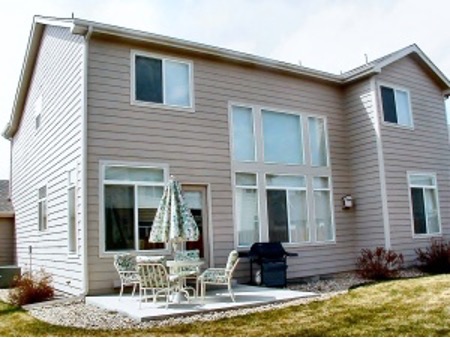
One day I was looking around to see what I could use to support a wire on the roof and got an idea to try to use the aluminum rain gutter on the east side of my house as my HF antenna instead. The gutter measured 25 feet vertically and then ran 35 feet horizontally for a total of 60 feet in overall length and resembled a ready-made inverted “L” or what is also known as a Marconi antenna configuration. That antenna needs a decent counterpoise to work correctly so I planted fifteen random length radials under the lawn. I then wired together the three aluminum window wells that were on that side of the house and added them to the planted radial wires. Additionally, I bolted together all of the aluminum lawn edging around my lawn and added a wire from that into the other counterpoise elements. According to the accepted theory, the more metal and wire you use in your radial system, the better. You might consider connecting to your radial system any nearby chain link fencing, metal lawn sprinkler piping, buried metal screening, water standpipes, underground water storage tanks, metal drainage culverts, railroad tracks, etc.
After the installation and in the initial trials, one of the drawbacks I noticed on the rain gutter antenna was that it was somewhat tricky to load on some of the bands using a conventional antenna trans-match. It was impossible to find a decent matching combination on 160 meters at all. Although, loading on the 80, 40, 30, 20, and 15 meters bands did not present as much of a problem and I could get an SWR match under 3:1 in a few small portions of those bands. Tuning on 10 meters was a bit tricky as well as finding any sort of decent match on 12 meters and 17 meters.
I looked at several possible solutions including one developed by my good ham friend, stealth antenna compatriot, DX’er, celebrated author, and renowned Physicist – Dr. Yardley Beers, WØJF (now SK) who volunteered to do all the complex mathematical calculations on my rain gutter antenna system. In a few days, he gave me a coil design that could be added to the feed point of the rain gutter in order for it to load on 160 meters. There was no doubt in my mind that his design would work.
Ultimately, though, I had decided on using a different approach. I had read a lot about the SGC-230 Smartuner™ Automatic Antenna Coupler in ham magazines and on the Internet. It seemed like a plausible solution to this problem IF it worked as advertised. The automatic antenna coupler is designed for use with end-fed unbalanced antennas such as whips and long wires. It can be configured to be used with dipoles and inverted vees as well. This automatically tunable antenna coupler is an ideal solution for this type of installation due to the fact that a rain gutter looks like a non-resonant end-fed unbalanced antenna.
What is the difference between an antenna coupler and an antenna tuner? According to the SGC manual, “antenna couplers” are placed at the antenna and match conditions of the antenna to the feed line in a very precise manner whereas, “antenna tuners” on the other hand, are generally located at the transmitter output at the transceiver end of the coaxial feed line. Furthermore, antenna tuners placed at the transmitter allow substantial losses in feed lines to be corrected at that point in order to “fool” a transmitter into working correctly. The losses are dissipated through heat or to ground. Conversely, a coupler installed at the antenna eliminates these losses by providing a proper match of the antenna at the feed point. The SGC-230 Smartuner™ is a true antenna “coupler”.
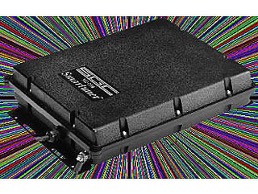
After purchasing the SGC-230 Smartuner™ from my local Denver HRO store I couldn’t wait to get it installed. Included within the formidable packaging of the box was an impressive and informative 81-page installation and operating manual that explained the coupler’s inner workings and it suggested various antenna applications for the SGC-230 with illustrations. Upon physical inspection of the unit, I was impressed by the ruggedness of the construction of the SGC-230. This hermetically-sealed antenna coupler was obviously meant to be installed outdoors and was even suitable for installation on shipboard. At a major military show,
I even saw one mounted on the side of an Army Humvee connected to their whip antenna! SGC builds other models of these types of antenna coupling devices but the SGC-230 Smartuner™ is rated at 200W input. I probably wouldn’t ever run more than 100 watts, but it is comforting to know that you are not running on the hairy edge of the limits of its power capabilities. I figured that the additional margin would translate into many extra years of trouble-free operation.
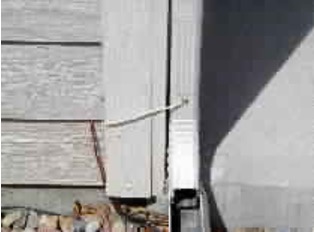
The installation was a snap. SGC gives you an additional quick installation guide for those of us that don’t like to read the whole manual. First, I mounted the antenna coupler as close as possible to the feed point of the rain gutter per the specification in the installation guide. This is because any portion of the feed wire that is connected to the SGC-230 becomes part of the overall length of the antenna too. So, I mounted my unit on the inside wall of the foundation of the basement just above the wooden base plate and below the flooring. This location was just opposite the downspout of the rain gutter, which served as my antenna feed point on the outside. A short distance of 8 inches away. I drilled two holes just larger than the O.D. of the intended feed-thru wires through the 2×12 inch base above the concrete foundation and on through to the outer siding. Then I took apart a piece of RG-8X coax and separated the inner conductor from the braided shield. The inner conductor would serve nicely as the feed wire from the coupler to the downspout. You are cautioned in the instructions not to use coax to hook up these auto couplers on the antenna feed side. The now-separated braided shielding served as the hookup to the outside radial wires and was then connected to the ground lug provided on the SGC- 230. Now all that was left was to connect the RG-8X coax from my rig to the input of the cable harness provided with the SGC-230. There is a set of control wires and voltage wires included in this coaxial cable harness. The +12 VDC hot wire and ground went to my 12 VDC power supply. There are control signal leads that are also provided that are used for an indication of the coupler`s tuning. An LED “antenna tuned” indicator was connected between +12 VDC and the control signal wire. When the antenna coupler has found a match, the coupler drives the signal to ground on the control wire, which causes the LED to light. It provides a good visual indicator close to my operating position because I can’t hear the quiet auto coupler relays engaging from my operating position. The total time for installation, from getting the unit out of the box to starting the initial testing, was under an hour.
To me, the “proof is in the pudding” and my acceptance would be how well it performed in on the air tests. First, I tried to load up the antenna on all the bands from 10 through 80 meters. Wow! no problem whatsoever! All bands indicated a 1:1 SWR and the initial tuning time on each band was from 3 to 4 seconds for finding a match. The Smartuner™ automatically evaluates and switches 64 input and 32 output capacitance combinations plus 256 inductance combinations in a “pi” network which equals over a half-million matching combinations. Once it finds a match, the SGC-230 has 500 memories in which it stores the LC combination in its non-volatile computer memory so that the next time that you operate on that same frequency it tunes almost instantaneously, usually in less than 10 milliseconds. Now for the band that I hadn’t been able to get a match on before… 160 meters. I went down to the CW portion where I usually operate and it found a match within 4 seconds. Life is good again! I also did not notice any “hunting” by the SGC antenna coupler once it has been tuned to a frequency.
I decided I would wait until the evening to perform some on the air experiments with some people I knew. I checked into a WAS Net on 75 meters that I have been active on for over 20 years and knew most of the hams there. These unwitting participants in my on-air tests were giving me S7 to S9+ reports from New England to California and from British Columbia to Florida. I had not let on to anyone before the net that I had done anything to my antenna system and thought I’d gather a few willing souls after the net to give me some further signal reports.
I was getting reports of S6 in New England later on as the band seemed to be changing a little but I was still getting S9+ reports from the southern states and was still S7 into British Columbia and Washington State and S9 into California. Most of these good folks know that I am using a rain gutter for an antenna but some of them think I am kidding them about it and using something more formidable for an antenna and maybe even a linear! So, after telling everyone on the WAS net about my latest antenna configuration and new addition, I got a comment from a station in Arkansas who said, “If I could put a signal like that out from my rain gutter, I’d get rid of my dipole and my linear too!” He said that my signal had been over S9 all night at his QTH. The band conditions were decent this particular evening but the reports were consistently well above previously logged reports I’ve had with those very same stations in the past under similar band conditions without the coupler. The signal reports remained fairly constant, plus or minus band conditions over the years.

Later that same week, I noticed on the DX-Cluster that the long-awaited K5K Kingman Reef DXpedition was up and running. This would be an ATNO (all-time new one) for me if I could get through the pileups. I knew that CW would be my best chance early on and I’d try for the SSB contacts later on during the DXpedition when the “big guns” had gotten their fill and their “feeding frenzy” was over. I caught K5K easily on 30 meters – no problem, as everyone on that band is fairly equal due to the power limitation. Later, I worked K5K on 15, 17, and 40 meters CW. I even got them on 40 meters SSB too! Finally, one evening I saw a spot for K5K on 160 meters. I hadn’t actually operated down here before with the rain gutter due to the problems I have previously noted. I heard him and set up split about 1.5 kHz up and slipped in my callsign fully preparing to be there for a while as his presence had attracted a fairly good pileup. He came back to me on my very first call! I was so shocked that I didn’t answer right away. I just kept staring at my radio – it was like having “buck fever” when you are out deer hunting. He sent my callsign again. I hurriedly snapped out of my trance and jumped onto my Vibroflex key and gave him the usual 5NN 5NN CO TU ES 73 DE WMØG. He acknowledged my reply and continued on to work the rest of the pileup. Not too bad! My very first 160 meters contact on the rain gutter was a rare DX station in a pileup. I was even more impressed now with my new antenna coupler. It had ‘played’ as advertised and had already justified its pricey self in my mind. I like to imagine that the other guys in that pileup thought that they had initially lost out to some “big gun” top band DX’er with his quarter wavelength high 160 meters 4-square vertical array and multi-KW amplifier — HI!
Since that time, I casually worked over 220 countries (all bands), and had enough confirmed QSO’s for WAS on 75 meters SSB. I even participated in the ARRL SSB Contest and managed to work 45 different countries in just 98 contacts, mostly on 20, 15, and 10 meters. These were accomplished in a little under three hours of actual operating time while being particular on who I called while “searching and pouncing”. While this is certainly not an impressive “run-rate” it is still is not a bad testimonial to the capabilities of the rain gutter antenna and SGC-230 automatic coupler combination. Even if one considers that most of the contest ops on the receiving end were using much more impressive antennas in order to hear me. Most stations I called were still coming back to me on my first or second call, except for a few of the rarer ones who had lots of QRM on their frequency.
I know now that when I install my next mobile HF radio installation, it too will have an SGC antenna coupler just ahead of the whip. Reports I’ve read on the resultant combination of the SGC series automatic antenna couplers used with plain steel whips have been very good from 160 meters on up. I also have read independent reviews that it works incredibly well with the equally pricey, but efficient, matching the SGC-303 9-foot tall mobile antenna. No, I don’t work for SGC, but I am a satisfied customer, and I don’t mind spreading the word about their quality products.
With regards to my experiences using a rain gutter for an antenna, I write this article in the fervent hope that some covenant-restricted or apartment dwelling ham, somewhere, will be inspired to replicate some form of stealthy antenna system as I, and many others, have done too. I would hope he or she would also then share their enjoyment of being on the HF bands with a respectable signal, despite the covenanted restrictions and physical obstacles around them.
This article is certainly not technical in its content, nor was it meant to be so. It is, however, testimony that one need not have ideal antenna conditions in order to operate effectively on the HF bands. Many books have been written on the subject of stealth amateur radio operation and all of them offer some very sound advice regarding the subject of stealth antennas. I suggest that if you have a desire to run a stealthy ham station you consult these books first. Also, go to the SGC web page and download one of their online manuals for their antenna auto couplers where you will find even more ideas and solutions. In the back of their manual under “Smartuner™ Installations & Applications,” you will see my rain gutter antenna article as well. Also, Steve Nichols, GØKYA published my article in the RSGB. I’m always interested in anyone who has been inspired to try this combination and hear about their success.
Jack, WM0G