Category Archives: Homebrewing

Articles and other information related to Homebrewing, station building, kit building, and other custom Ham Radio projects.

A Stealth Antenna Farm

Living in a community that expressly prohibits ham radio towers often means enduring constant frustration trying to work DX with wire antennas or a multi-band vertical with what is always an inadequate radial field (read: less than 200 radials) over the “worse soil in the world”. My mantra of “work ’em on all bands and all modes” that I pursued for many years from my NH QTH has morphed to “hope I can hear them and they can hear me”. My lot can support a 40-foot tower that would be great for a small beam like the Cycle 24 used during the World Radiosport Team Championship a couple of years ago. Unfortunately, I would never get past a permit for the tower base if I ever tried to put one up.

Ah, but there is hope. The frustrations wrought by CC&R limitations often bring out the ingenuity in hams. Thanks to Layne, AE1N, I visited the website of Jeff, AC0C (see AC0C.com). Jeff lived in a condo with the no-tower restrictions. He looked over the attic where he lived and set about figuring out how to build an array of beams using the roof support structure. In a triangular volume measuring 16 feet at the apex, 20 feet long, and 40 feet wide, he managed to cram in a 22-element array that covers 160 – 6 meters! A scan of Jeff’s website is a testament to a ham’s perseverance to build an antenna farm where common sense says you cannot. Jeff used the popular EZNEC modeling program developed and maintained by Roy, W7EL. The overall configuration of the project shown on Jeff’s website looks like the proverbial rat’s nest. Somewhere on his site he mentions using over 1000 feet of coax, hundreds of ferrite cores, dozens of relays, and numerous switching boards to select the desired antenna while holding the RFI beast at bay.

Intrigued by Jeff’s work, I decided to take a look at my garage attic and see what I could do. My attic measures about 17.5 feet long, 19 feet wide, and 5 feet at the center above the floor. There is usable space beyond the garage over the remainder of the house that runs to the back, providing more depth. Unfortunately, my attic runs N-S so that any fixed antenna would have to be situated to favor a pattern to the E/NE direction for DX. I studied Jeff’s design for his 2-element 40 meter Yagi and decided to scale it for 30 meters. Each element resembles an inverted-V with the lower half of the ends bent at right angles to run horizontally along the floor of the attic. The horizontal portions of each element run toward each other so that the antenna resembles a modified “bent” Moxon antenna. (The Moxon antenna owes its design to Les Moxon, G3XN (SK). It is a 2-element beam that resembles a rectangle, is easy to build, and is forgiving in dimensions for a given band.)

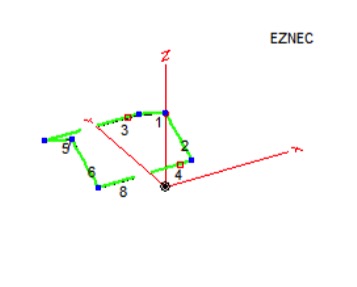
I modeled the antenna with a separation of 19 feet between the elements and inserted loading coils in the driven element to shorten them. The apex height of the antenna is only about 14 feet above the ground so I was not expecting spectacular gain in the primary direction (North). The resulting pattern resembled a low dipole with maximum gain of 4.5 dB North and South, dropping to 3.4 dB at 45 degrees. While this may seem respectable, it occurs for an elevation angle of 45 degrees which means it would not work very well for typical DX angles. Indeed, when I looked at the gain performance at 24 degrees elevation, I had less than a dB. (The astute DX’er will notice that good DX performance occurs for elevation angles of 15 – 20 degrees. When limited to a height of 14 feet, the gain profile at 15 degrees is over 8 dB down from its peak.) Figure 1 shows the layout of the antenna. I realized that I’d be better off with a 30-meter inverted-V dipole off the back of the house.

Stealth Antenna– 30-meter 2-element Attic Yagi
Figure 1 – 30-meter 2-element Attic Yagi

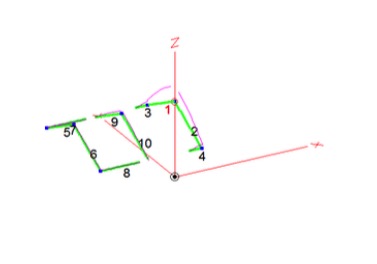
Not to be deterred, I then modeled a 17-meter 2-element beam using relays to disconnect the 30-meter element at its coils and inserting an inverted-V element between the 30-meter elements to act as a director for 17. Figure 2 shows the results where the driven element is on the right and the director is at the center.

Stealth Antenna – 17-meter & 30-meter Attic Yagis
Figure 2 – 17-meter & 30-meter Attic Yagis

The performance for 17 meters was similar to 30 meters with a modified dipole pattern. The gain was a little better at a 24-degree elevation angle but still less than 2 dB. Again, better to stay with my inverted-V that boasts a 3.8 dB gain toward NE.

While I pondered my next move, it occurred to me that what worked for Jeff might not be the best idea for me. All that coax and those ferrite cores pointed to a lot of blood, sweat, and tears to get rid of RFI gremlins that such close quarters tend to foster. I considered using relays to change bands by lengthening or shortening the antenna elements. However, this would mean control cable wires from the shack to the antennas, themselves inadvertent antennas when transmitting. There has to be a better way.

Then, the long-dormant light bulb in my head came on. Why not try a 2-element wire beam? I looked at a model for such a beam for 17 and 15 meters, 2 elements for each band on the same “boom” and each fed separately. The results showed 17 meters behaves as expected with a gain of 6.2 dBi and a F/B of 21.6 dB. However, the 15-meter portion had a peanut-shaped pattern that was reversed from the intended direction with a F/B of less than 5 dB. I adjusted the height of the 15-meter elements within the available limits but to no avail.

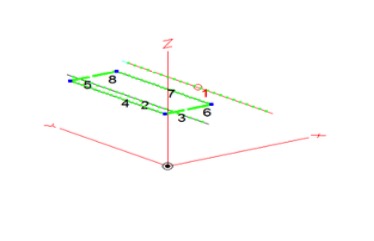
Now what? I looked at the Moxon design again for its space-saving feature to see if I could get more isolation between the beams. I pulled up the file for the 2-element 17-meter beam and another file for a 15-meter Moxon beam. I merged the two antennas and juggled the positions so that the Moxon was a foot above the wire beam. Figure 3 shows the EZNEC model.

Stealth Antenna – 17-meter Beam with 15-meter Moxon Above
Figure 3 – 17-meter Beam with 15-meter Moxon Above

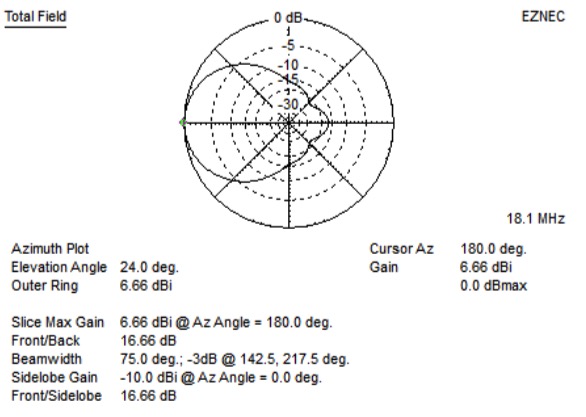
Figure 4 shows the azimuth gain pattern for the 17-meter beam.

Stealth Antenna – 17-meter Beam Pattern (15-meter Moxon Above it)
Figure 4 – 17-meter Beam Pattern (15-meter Moxon Above it)

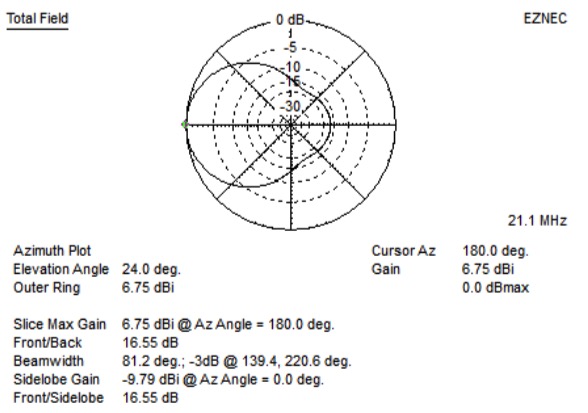
Changing antennas for the 15-meter Moxon antenna produces the pattern shown in Figure 5.

Stealth Antenna – 15-meter Moxon Gain Performance
Figure 5 – 15-meter Moxon Gain Performance

As the model plots suggest, both antennas have nearly identical performance. Success at last! At least on paper minus any interactions and interfering structures such as air conditioning ducts and electrical wiring. Installing two antennas with separate feeds is easy to control with a remote antenna switch. I avoided the need for relays to shorten elements on 17 meters in order to work on 15 meters. I did not want to use relays because of the prospect of RFI causing them to trip, and the need for extra wires from my shack plus ferrite cores for RFI suppression. Now on to the fun part – BUILD IT.

KB1OIQ – Andy’s Ham Radio Linux download on SourceForge.net

KB1OIQ – Andy’s Ham Radio Linux download. KB1OIQ – Andy’s Ham Radio Linux CD free download. KB1OIQ – Andy’s Ham Radio Linux Ubuntu Linux remastered for Amateur Radio users

Source: KB1OIQ – Andy’s Ham Radio Linux download on SourceForge.net

Andy attended our Club Meeting on Tuesday, May 4th to talk with us about using Linux and various HAM Radio applications which run on it. The page mentioned above contains links to Andy’s Linux HAM Radio files. You can see a copy of Andy’s presentation here.

Rig Audio Interfacing and Low Cost PC Headsets

First I want to promote some excellent papers on rig interfacing and grounding produced by Jim Brown K9YC.  There is a wealth of information there, produced by a very talented and experienced engineer.

Now…on to the topic of interfacing PC headset to ham rigs…

Heil Headsets get a lot of support and advertising in the amateur community.  But they are expensive.  The W2SZ VHF/UHF contest group that I belong to uses mostly Heil headsets, so I have a lot of experience with them.  The problem is that a lot of them are broken.  We only use them two weekends a year for about 36 hours but they fail in a variety of ways.

I don’t own a Heil headset (I’m too cheap), but wanted a more reliable headset for my own use on the mountain.  In this case, reliable means I can bring several for a reasonable price.  So, this led to a series of experiments with PC headsets that are available for prices that range from about $13 to $50.

PC headsets and Heil headsets operate differently.  Heil headsets use a dynamic microphone and cannot tolerate any DC current through the microphone.  PC headsets require a DC bias voltage to operate their electret microphone.

The diagrams below (copied from a great presentation on rig interfacing by AudioSystemGroup)  shows the two ways a PC puts electret bias on the ring terminal of the 3.5 mm microphone jack.

Rig Audio Interface Schematic

All PC headsets have the ring terminal for bias…that is the key to this design.

Rig Audio Interface Schematic

The box below takes 8 volts from the ICOM microphone connector and uses it to power the PC headset.  The circuit has…

  • 3.5 mm (1/8th inch phone) jack for the microphone
  • 0.47 uFd series cap on the microphone, pass audio and block DC
  • 2.2K resistor to pass DC from the 8V pin to the ring terminal
  • 1/4 inch phone jack for rig keying
  • Cable and ICOM microphone plug

Rig Audio Interface Circuit

Rig Audio Interface Circuit

It was important to ensure the Heil headset doesn’t see any DC if plugged into the microphone jack of this adapter.  The design put bias on the ring terminal to feed the PC headset.  But, the Heil microphone connector does not have a ring terminal so it simply grounds the bias voltage… so, no bias gets to the Heil.   The dynamic microphone in the Heil couples audio through the series cap.

Here’s another design.  This one has two 3.5 mm connectors, one jack, one plug plus a battery.  The battery supplies power to the PC headset without the need for power from the transceiver.  This also supplies power to the ring terminal and block DC to the microphone on the tip terminal.  This took about 5 minutes, the components are under the tape.

Rig Audio Interface Circuit

One of our W2SZ members, Tom Price KC2PSC, designed of a PC board to implement this idea.

  • RJ-45 connector for rig microphone interface
  • Converts to 3.5 mm microphone and line out
  • Converts 1/4 inch phone for rig keying
  • Includes option for battery

Rig Audio Interface Circuit

There are a number of web sites that discuss the same thing

Radio Amateurs Developing Skills Worldwide