Category Archives: Featured

This category is for featured articles that we want to include in the sidebars and other areas on our website.

HAB-4 Launch Preparations

We are again working with Hudson Memorial School on a High-Altitude Balloon (HAB) Project. Dan Pooler, AC1EN and Adam Goldstein, KC1KBZ have completed most of the classroom instruction in preparation for a HAB-4 launch and we are now looking for a suitable set of conditions to launch! We have begun final HAB launch prep which includes some modifications to the flight platform to improve its cold temperature performance.
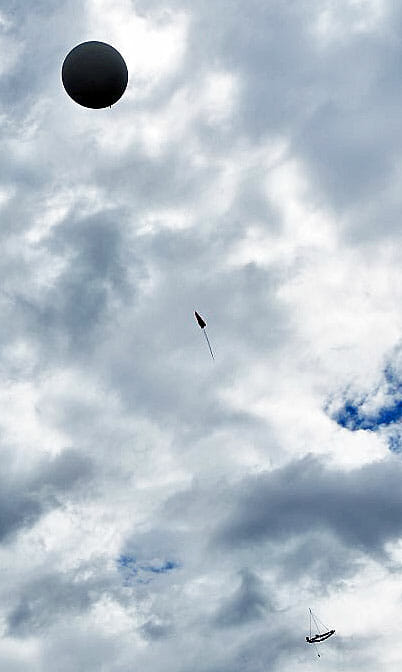
HAB-1 In Flight
Our HAB In Flight

We’ve established a set of windows for a possible launch of HAB-4 as follows:

  • Oct 20 or Oct 21 (Sat or Sun) – this coming weekend
  • Oct 27 or Oct 28 (Sat or Sun)
  • Nov 10 or Nov 11 (Sat or Sun)

We’ve also begun the final preparations for HAB-4’s launch

HAB Launch Prep

We’ve had some problems with very cold temperatures stopping our GoPro video cameras on the HAB during HAB-2 and HAB-3’s flights.
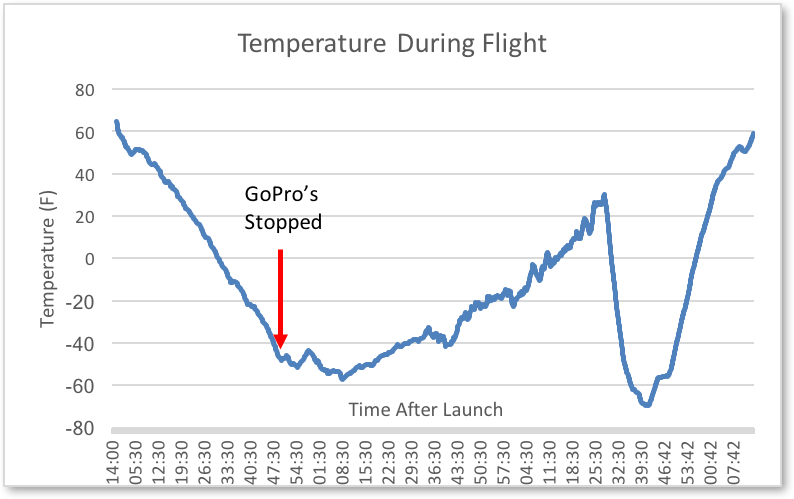
HAB-2 Temperature Data - HAB Launch Prep
HAB-2 Temperature Data

We saw temperatures of -60° F and lower during our last two flights. The cameras will function to about -40°F so we need an insulation and heating system that can keep the cameras warmer than this for the 30 to 45 minutes when the coldest temperatures are present.
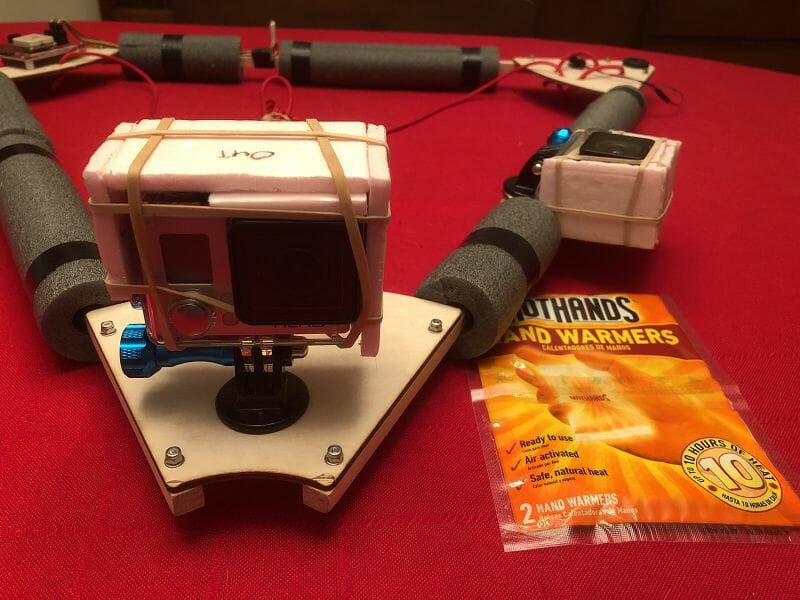
HAB Camera Insulation and Heating System - HAB Launch Prep
HAB Camera Insulation and Heating System

We’ve come up with a simple insulating and heating system for our cameras in an attempt to mitigate the cold temperature problems. Our approach is to attach a small hand warmer to the back of each camera and then insulate them to keep the heat from the warmers and the camera batteries in the camera case. We’ve also moved to sealed camera cases which should help to keep the heat inside the assembly. Our solution is lightweight and only adds about 25 grams to the weight of each camera.

With these modifications in place, we’ve carefully weighed all of the components of the HAB and determined that the launch weight for HAB-4 will be 930 grams.

Balloon Performance Parameters

With the final weight of HAB-4 established, we can use a Balloon Performance Calculator to determine the ascent time and burst altitude for HAB-4.
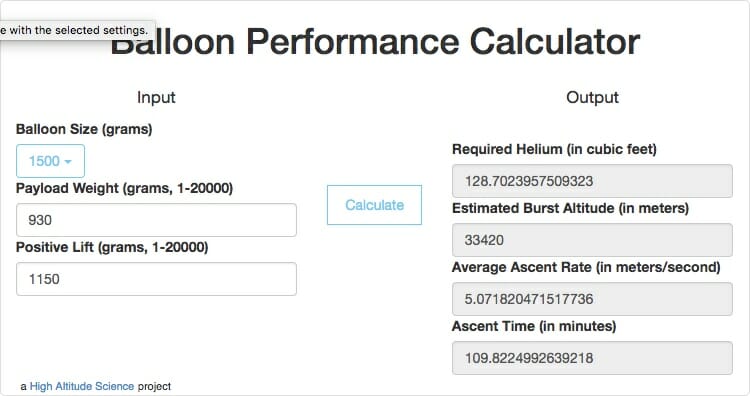
HAB-4 Balloon Performance Results

We need to hold the ascent time to under 110 mins to ensure that the GoPro camera batteries on the HAB have enough capacity to operate the cameras throughout the flight. With a positive lift of 1,150 grams, HAB-4 should reach an altitude of 33,420 meters (approx. 109,600 ft) and the ascent should last a little under the target 110 minutes.

Flight Path Predictions

We typically launch from the Elementary School in Winchester, NH which is in the western part of the state.
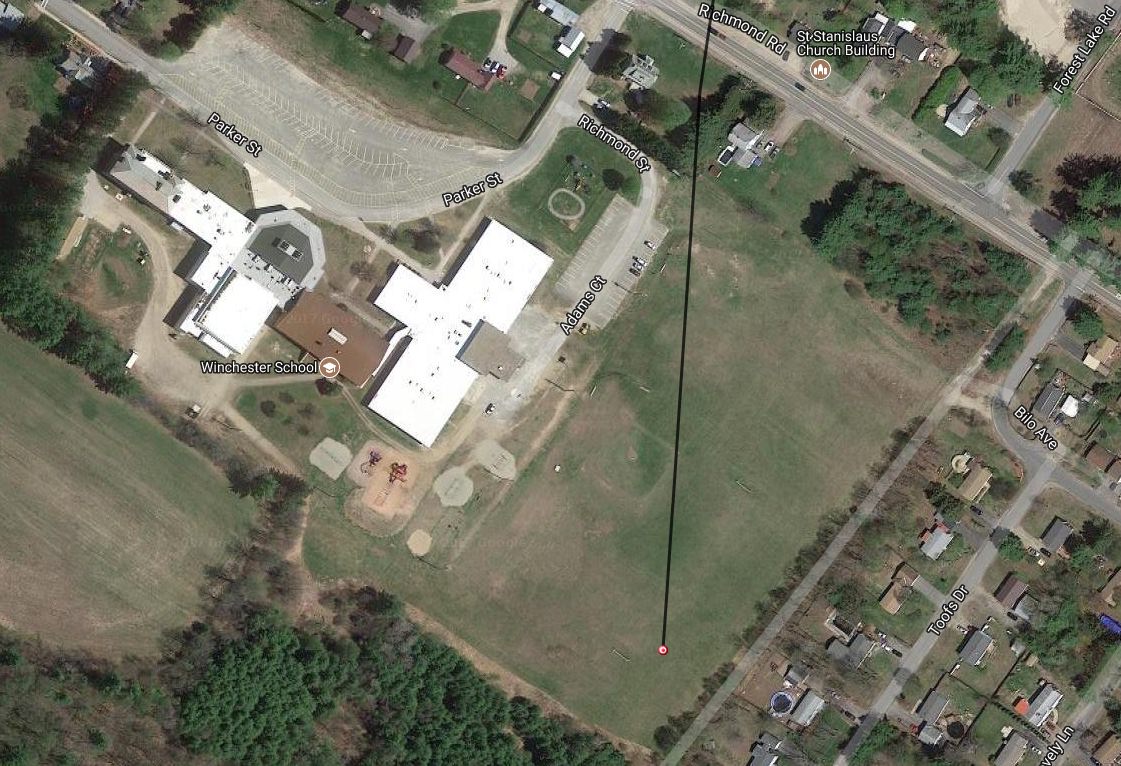
HAB-2 Launch Site in Winchester NH
HAB Launch Site in Winchester NH

Winchester is far enough west of the coastline to keep the HAB from landing the ocean when Jetstream winds are quiet to moderate.

Current HAB-4 Flight Path Prediction for Sunday, October 21st

We use on an online HAB flight path prediction tool which takes Jetstream and ground weather forecasts into account and uses our HAB’s flight parameters to predict our HAB’s flight path. The Jetstream forecasts are not very accurate until a few days before the launch so we need run daily path predictions for about a week before a possible launch date to see whether we can launch on a given date. As you can see from the above prediction, we are not yet in a position to launch this coming Sunday but the forecasts are improving.

Testing the Flight Platform

The final steps in launch preparation are to test the electronics on the HAB’s flight platform to ensure that everything is working, clear the Camera and Flight Computer SD memory cards, and charge/replace all of the batteries.
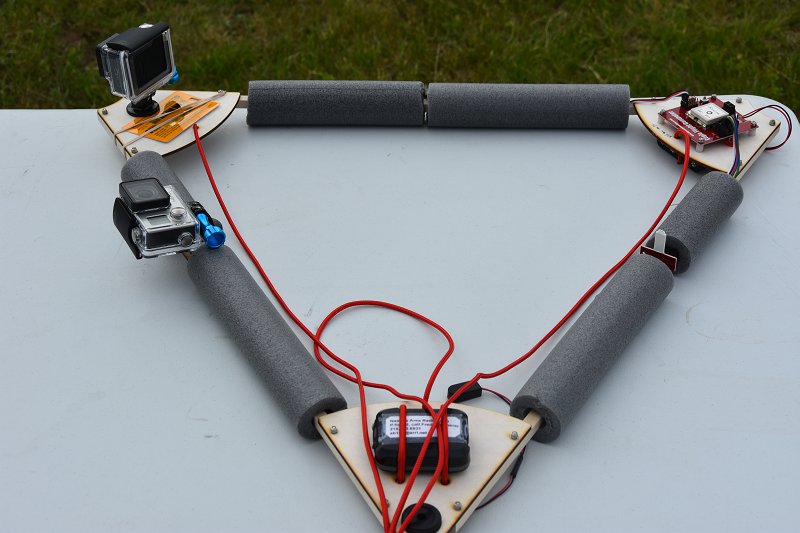
Flight Platform Final Assembly and Test
HAB Flight PlatformTest

These steps are currently underway. When these steps are complete and we have favorable Jetstream and ground weather conditions, we’ll be ready to launch

We will continue to post updates as we countdown to the HAB-4 launch. All members and friends of the Nashua Area Radio Society at invited to attend the launch and everyone can track the HAB using aprs.fi as it flies.

Fred, AB1OC
Add SDR Capabilities to Your Radio

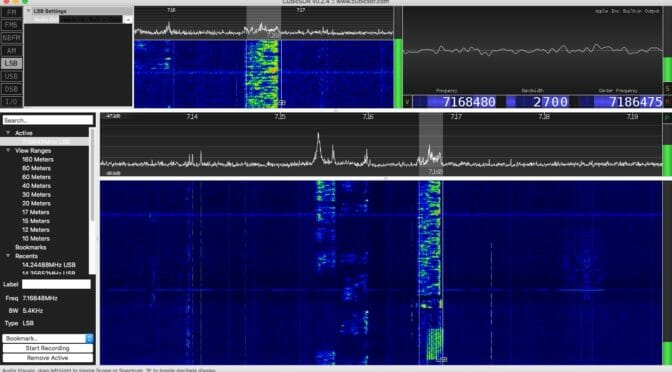
Having SDR capabilities like a waterfall display and point-and-click tuning can be added to your existing station. I’ll show you one easy way to do it.

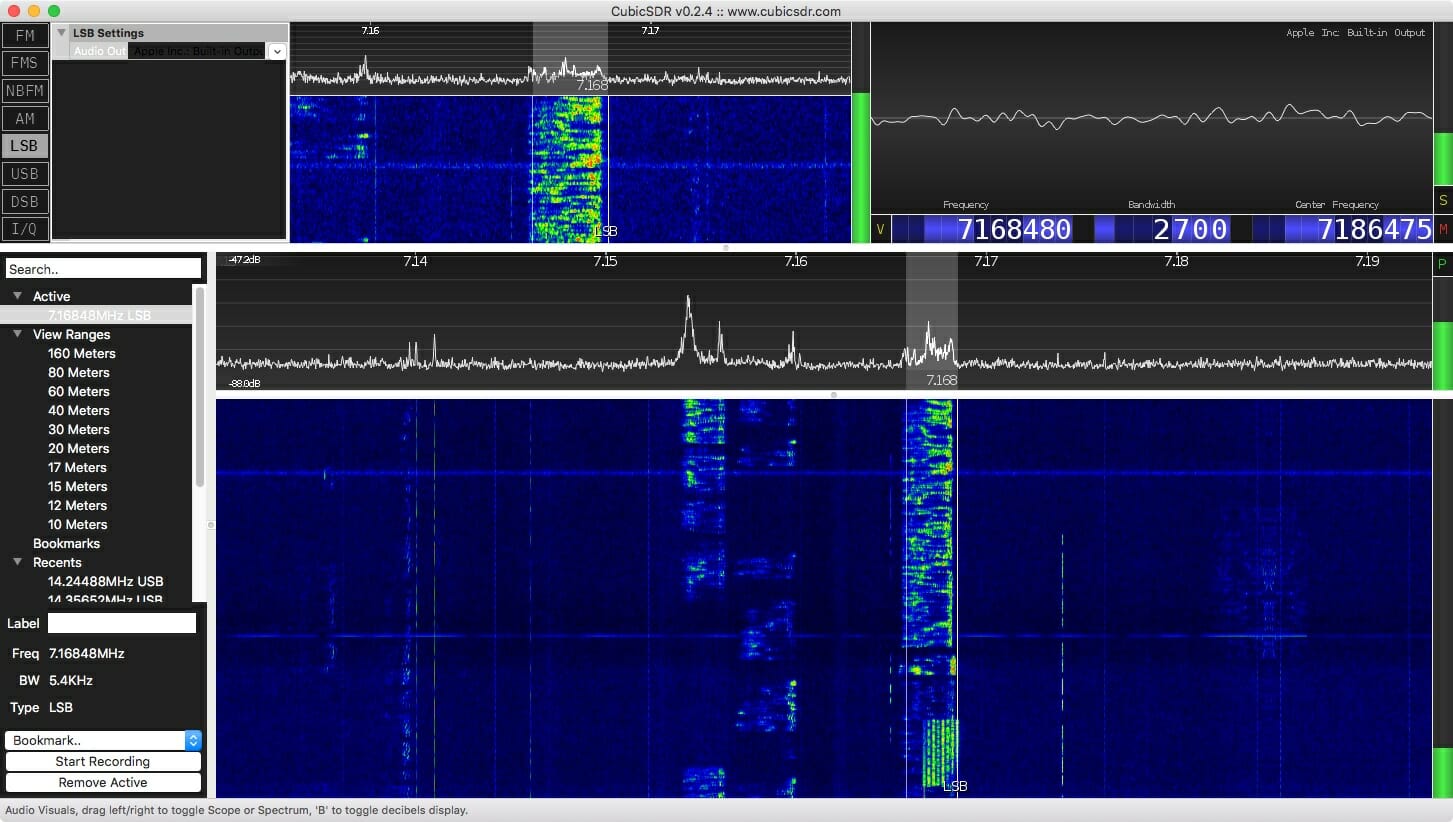
Waterfall from an SDR

Antenna port management

Care must be taken that your SDR is protected from your transmitted signal. If you are sharing an antenna between your rig and an SDR receiver you need to ensure that your transmitted signal doesn’t go directly into a receiver! Years ago hams had receivers and they had transmitters. They switched between the two as they worked. The receiver was isolated from the transmitter while transmitting. Your transceiver does the same thing. It uncouples the receiver from the antenna when you transmit.

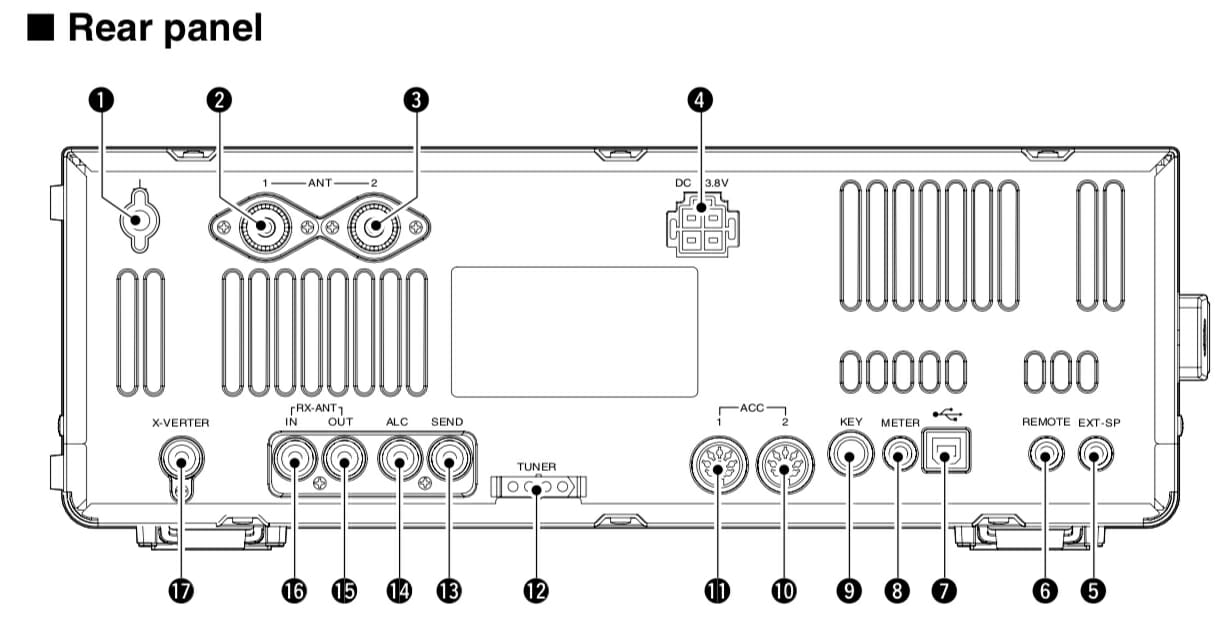
Some radios allow you to tap into the receiver’s receive path. My ICOM IC-7600, for example, has two RCA connectors labeled “RX ANT IN” and “OUT.” The IN and OUT are normally connected together. That is the default and in this condition things work exactly as you expect. But, you can select an option that separates these two signal paths.

RF in and RF out connectors on an IC-7600

Figure 1. Refs 16 and 17 are RX ANT IN and OUT, respectively.

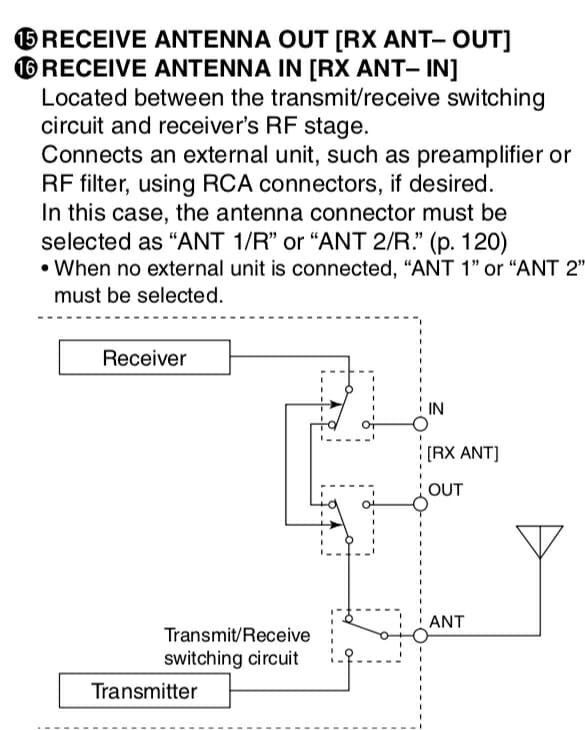
Figure 2 shows this relationship a little better.

ANT IN / OUT

Figure 2. Receive signal management in an IC-7600

If you had a receive-only antenna (like a Beverage) then you would separate the path, isolating your receiver from the transmit antenna, and sending it instead to your receive-only antenna (Connected to IN.) That configuration shown in Figure 2 is the default where the receive and transmit antenna are the same. If the relays around IN and OUT were switched the other way, the connection from the receiver to the transmit antenna can never happen. That’s how we ensure our receive-only antenna is used during receive. (It would be connected to RX ANT IN.)

Splitting the signal

In this exercise we’re going to add an SDR to the mix, not a receive antenna, but we use all the same stuff. What we need to do is tap into the received signal for the SDR without disturbing (too much) the signal that goes into the receiver of the ICOM. That is, I want to take the one signal (from the antenna) and split it between two receivers (the ICOM and an SDR). There is a device that does that and I’ve pictured it in Figure 3.

Mini-Circuits ZFSC-2-6+ Signal Splitter 0.002 to 60 MHz

Figure 3. A Mini-Circuits signal splitter.

This device is about as simple as something like this gets. The Mini-Circuit ZFSC-2-6+ takes one input and splits the signal to two outputs. So, we take the signal received from RX ANT OUT, send it to the splitter, and then take the two outputs and route one back to RX ANT IN (for the ICOM) and the other to an SDR. Now all you need to do is ensure your radio is using ANT 1/R or ANT 2/R so the signals remain split.

Choosing an SDR

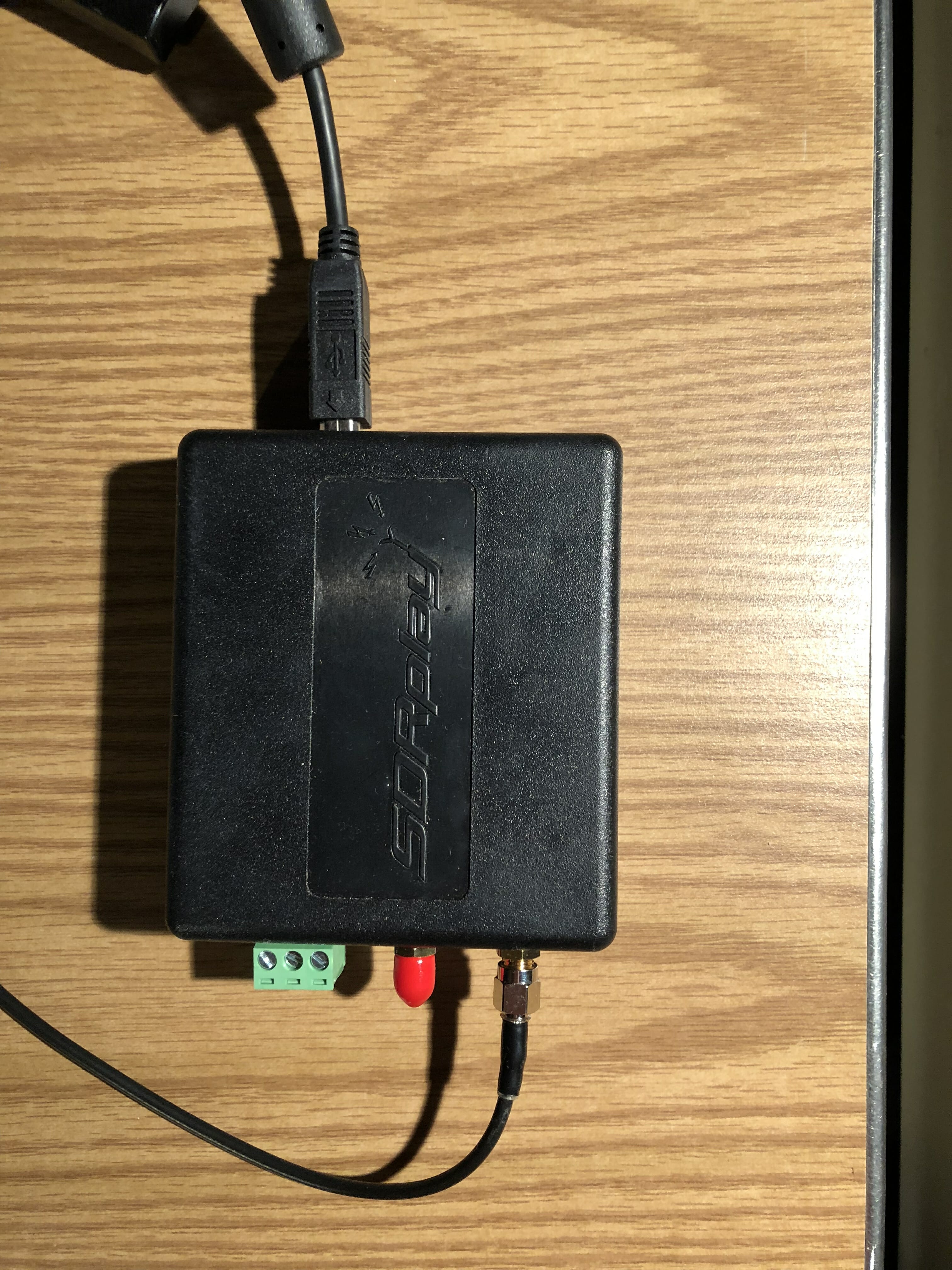
There are many, many small SDR receivers available. I selected the SDRplay RSP 2 receiver as shown in Figure 4.

SDRPlay RSP 2 receiver

Figure 4. The SDRplay RSP2 receiver

The antenna connection comes from one of the ports of the signal splitter. The unit is powered by, and communicates to, the computer via the USB cable shown near the top. This is a small unit and I tuck it neatly behind some other stuff and out of the way. There are no controls on the unit so there’s no reason to handle it again.

Software

Just as there are many choices for SDR receivers, there are many many choices for software. Ask any ten hams which one is best and you’ll likely get eleven answers. So, I recommend trying a few for your platform (I’m on a Mac) and see which one you like best.

SDRplay recommends CubicSDR and I’ve found the software fairly easy to use with an easy learning curve. SDRplay has software for the following platforms:

  • Windows
  • Linux x86
  • Mac
  • Raspberry Pi
  • Android
  • ARM64

A screenshot of CubicSDR is shown at the top of this article.

The software allows me to see a wide slice of spectrum, a waterfall showing a history of signals, point-and-click tuning (once you’ve enabled rig control), and, of course, it is a receiver so it gives me sound from the tuned signal through my computer speakers.

Performance

The splitter has very little insertion loss (0.3 dB), but of course the signals themselves will each be down about 3 dB (since each signal is half the original). A loss of 3 dB is about half an S-unit, so you’ll never hear the difference. And, since the SDR is much more sensitive than my ears I consider its addition a win.

Impressions so far

I used this system while playing in the California QSO Party. It was fun clicking on a signal in the waterfall and having the radio obey my request. Hard-core SDR fans will likely talk about the power of visualization for finding a signal, or even finding open spots if you wish to call CQ. With this arrangement, you can have all that using your existing radio.

Coming in December

Would you like to try building an SDR for about $25 plus a Raspberry Pi? Come to the December Tech Night where we’ll have an SDR workshop. More detail on this to follow in a few weeks.

Links

Scott, NE1RD

Plans for Satellite Station Upgrades

We have begun looking ahead to Satellite Station 4.0 and where we want to go next after our ARISS crew contact is complete. Our goals for the Satellite Station 4.0 include …

Source: A Portable Satellite Station Part 6 – Plans for a 4.0 Station

We are planning a series of upgrades to our Satellite Stations enhance Remote, Transportable, and Portable operation. These plans are firming up and installation of the upgrades is well underway. You can read more about what we are doing via the link above.

Fred, AB1OC

Radio Amateurs Developing Skills Worldwide