

The annual ARRL Field Day is one of the Nashua Area Radio Society’s most important activities. Field Day is sponsored by the ARRL and is all about being prepared and trained to establish emergency communication in the event of a disaster or other public need. Also, Field Day is great fun for Ham Radio operators across North America!
The Nashua Area Radio Society has a long and rich history of many successful Field Day operations. We provide multiple towers and beams and we will typically mount a 7 to 10-station effort operating SSB phone, Digital, and CW on multiple bands. You can learn more about our Field Day activities by reading the many articles about Field Day on our Blog.
Our Field Day operations are a major undertaking for us each year. As a result, we begin planning each year’s Field Day Operation many months in advance. Also, we make a significant investment in Field Day-related equipment each year.
Note that everyone is required to follow our COVID-19 Safety Policy to attend our Field Day activities.
2021 Summer Field Day Highlights
We are back to in-person Field Day operations in 2021! We operated from Keyes Memorial Park in Milford, NH. Keyes provides a great public location, a large open area, and an open pavilion that provided plenty of space and a COVID safe environment. Our station teams did a great job with putting up our station for Field Day. Special thanks go out to the Team Leaders – Jon, AC1EV; Jeff, AC1FX; Anita, AB1QB; and Fred, AB1OC. Our station went (and came down) in record time this year and the process went very smoothly. Thank you to everyone who helped with setup and takedown at Field Day!
The bands were in good condition and our score reflects some great operating to take advantage of conditions. Our score was excellent and we achieved s total score that was 75% of what was previously did with a Sumer Field Day station that was three times larger.
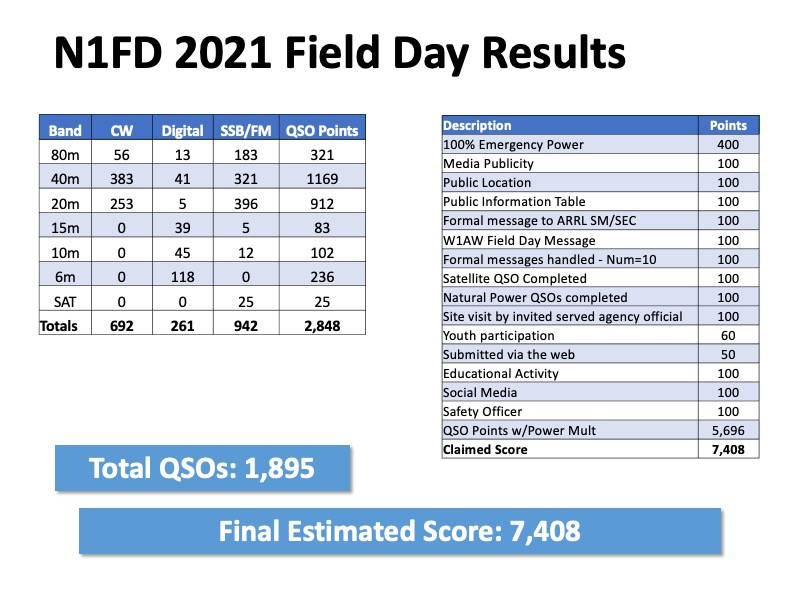
Here’s a summary of our operating results:
- We had a 4 transmitter station on emergency power (4A) for Summer Field Day 2021, plus a satellite ground station as our “free VHF” rig
- We made a total of 1,895 unique (non-duplicate) contacts during the 24-hour operating period
- We had an amazing 692 CW, 942 Phone, and 261 Digital Contacts!
- We made 236 contacts on the Magic Band (6m)
- We made 25 contacts through satellites and the ISS in space
Our final claimed score (after removing duplicates) was:
- Total QSO Points -2,848
- Power Multiplier (100W or less) – 2
- Score from QSOs – 5,696
- Total Bonus points – 1,710
Final Claimed Score – 7,408
Here’s a breakdown of our score:
2020 Winter Field Day Highlights
We had a great Winter Field Day (WFD) in 2020. WFD provides some real practice and a great chance to develop our Emergency Communications (EmCOM) skills and to get additional practice setting up our towers and antennas. We operated from Keyes Memorial Park in Milford, NH again in 2020. Keyes provides a great public location, a large open area, and an open pavilion that could be used to construct a temporary outdoor shelter. Jerry K1OKD, Craig, N1SFT, Jon AC1EV, Jamey AC1DC, John KB1EEU, and Fred, AB1OC led the 2019 Winter Field Day Team. Jeff, AC1FX served as our Safety Officer and Peter, KC1FNF served as our Food Chairperson. Also, Anita AB1QB served as the leader of an independent new activity – VHF+ Roving for Winter Field Day.
Here’s a summary of our operating results:
- We had a 5 transmitter Outdoor station (5O) for WFD 2020, adding an additional transmitter over WFD 2019
- We made a total of 1,133 unique (non-duplicate) contacts during the 24-hour operating period
- We worked 46 of the 50 US States
- We worked all but 8 ARRL sections in the US and Canada
- We had an amazing 612 CW, 486 Phone, and 35 Digital Contacts!
- We added a number of bands to our station which enabled us to turn in a solid performance with 35 band-mode multipliers
- Our 160m portable antenna system worked even better than last year! We made 244 contacts on 160m using just 100W!
Our final claimed score (after removing duplicates) was:
- Total QSO Points – 1,780
- Power Multiplier (100W or less) – 2
- Band-Mode Multipliers – 35
- Score from QSOs – 124,600
- Outdoor Bonus – 1,500
- No Commercial Power Bonus – 1,500
- Not At Home Location Bonus – 1,500
- Satellite Contact Bonus – 1,500
Final Claimed Score – 130,600
Our top operators included:
| Operator | Call Sign | QSOs | % of Total QSOs |
|---|---|---|---|
| Dave Pascoe | KM3T | 246 | 22% |
| Marty Sullaway | NN1C | 223 | 20% |
| Abby Finchum | AB1BY | 167 | 15% |
| Bill Noyce | AB1AV | 139 | 12% |
| Dennis Marandos | K1LGQ | 90 | 8% |
| Fred Kemmerer | AB1OC | 76 | 7% |
| Keith Sangillo | KC1IMK | 71 | 6% |
| Other Operators Combined | --- | 121 | 10% |
Here’s a breakdown of our contacts by Band and Mode:
| Band | Phone | CW | Digital | Total | % of Total QSOs |
|---|---|---|---|---|---|
| 160m | 2 | 242 | 244 | 21.5% | |
| 80m | 19 | 118 | 7 | 144 | 12.7% |
| 40m | 226 | 108 | 6 | 340 | 30% |
| 20m | 192 | 128 | 9 | 329 | 29% |
| 15m | 3 | 1 | 1 | 5 | <1% |
| 10m | 3 | 1 | 1 | 5 | <1% |
| 6m | 18 | 3 | 1 | 22 | 1.9% |
| 2m | 10 | 3 | 2 | 15 | 1.3% |
| 1.25m | 3 | 2 | 2 | 7 | <1% |
| 70cm | 3 | 2 | 2 | 7 | <1% |
| 33cm | 3 | 2 | 2 | 7 | <1% |
| 23cm | 3 | 2 | 2 | 7 | <1% |
| Satellite | 1 | 1 | <1% | ||
| Totals | 486 | 612 | 35 | 1,133 | 100% |
You can read more about our 2020 Winter Field Day operation on our Blog:
- Winter Field Day 2020 Is Comming
- Winter Field Day 2020 Update
- Winter Field Day 2020 VHF+ Preparations
- VHF+ Station Prep for Winter Field Day 2020
- Winter Field Day 2020 Final Station Test
- Winter Field Day 2020 Highlights
- Winter Field Day Roving On VHF+ Bands
Additional Field Day highlights and memories can be found in the picture gallery above.
2019 Field Day Highlights
The Nashua Area Radio Society built an 11A Field Day station at Hudson Memorial School for ARRL Field Day 2019. We added a 4th tower for VHF and up as well as our 160-meter setup from Winter Field Day 2019. Our score increased by over 3,000 points this year thanks to some top-notch CW ops, more intense operating overall, and the use of the FT8 mode for digital operations. Our top operators included:
| Operator | Call Sign | QSOs | % of Total QSOs |
|---|---|---|---|
| Matt Strelow | KC1XX | 489 | 16.5% |
| Bob Raymond | WA1Z | 393 | 13.3% |
| Jamey Finchum | AC1DC | 275 | 9.3% |
| Abby Finchum | AB1BY | 271 | 9.2% |
| Keith Sangillo | KC1IMK | 167 | 5.7% |
| Connor Finchum | KC1GGX | 132 | 4.5% |
| Dennis Marandos | K1LGQ | 132 | 4.5% |
| Other Operators Combined | --- | 1,096 | 37% |
You can find some interesting articles about our 2019 Field Day Operation on our Blog here:
- 160-Meter Portable Antenna System for Field Day
- Field Day 2019 Plans and Station Test
- Final Field Day Station Test
- Field Day Satellites, VHF+, and Fox Hunting
- Field Day 2019 Recap
Final Claimed Score – 12,686
2019 Winter Field Day Highlights
We decided to do Winter Field Day for the first time in 2019 as a means to practice our Emergency Communications (EMCOM) skills and to get additional practice setting up our towers and antennas. We decided to operate from Keyes Memorial Park in Milford, NH due to its public location, large open area, and availability of an open pavilion that could be used to construct a temporary outdoor shelter. Craig, N1SFT, Jerry K1OKD, Charlie W1CBD, Dave K1DLM, Mike, K1WVO, John KB1EEU, and Fred, AB1OC led the 2019 Winter Field Day Team.
Here’s a summary of our operating results:
- We made a total of 1,146 contacts during the 24-hour operating period
- We worked 48 of the 50 US States
- We worked all but 6 ARRL sections in the US and Canada
- We worked 14 Countries
- We had an amazing 329 CW, 756 Phone, and 61 Digital Contacts!
- We turned in a solid performance with 15 multipliers
- Our 160m portable antenna system worked amazingly well. We made 134 contacts on 160m using just 100W including one to Missoula, MT – a 2,100 mi contact.
Our final claimed score (after removing duplicates) was:
- Total QSO Points – 1,484
- Power Multiplier (100W or less) – 2
- Band-Mode Multiplier – 15
- Score from QSOs – 44,520
- Outdoor Bonus – 1,500
- No Commercial Power Bonus – 1,500
- Not At Home Location Bonus – 1,500
- Satellite Contact Bonus – 1,500
Final Claimed Score – 50,520
Our top operators included:
| Operator | Call Sign | QSOs | % of Total QSOs |
|---|---|---|---|
| Jamey Finchum | AC1DC | 214 | 19 |
| Dave Pascoe | KM3T | 198 | 17 |
| Dave Merchant | K1DLM | 118 | 10 |
| Bill Noyce | AB1AV | 116 | 10 |
| Fred Kemmerer | AB1OC | 111 | 10 |
| Abby Finchum | AB1BY | 100 | 9 |
| Other Operators Combined | --- | 857 | 25 |
Here’s a breakdown of our contacts by Band and Mode:
| Band | Phone | CW | Digital | Total | % of Total QSOs |
|---|---|---|---|---|---|
| 160m | 1 | 133 | 134 | 12 | |
| 80m | 219 | 3 | 24 | 246 | 21 |
| 40m | 251 | 95 | 26 | 372 | 32 |
| 20m | 279 | 97 | 11 | 387 | 34 |
| 15m | 2 | 2 | <1 | ||
| 6m | 1 | 1 | <1 | ||
| 2m | 2 | 1 | 3 | <1 | |
| Satellite | 1 | 1 | <1 | ||
| Totals | 756 | 329 | 61 | 1,146 | 100 |
You can see an article about our 2019 Winter Field Day operation here. Additional Field Day highlights and memories can be found in the picture gallery above.
2018 ARRL Field Day Highlights
Our 2018 ARRL Field Day Incident Commanders were Fred Kemmerer, AB1OC, Dave Merchant, K1DLM, and Hamilton Stewart, K1HMS. N1FD was 10A in 2018. We had a lot of fun and made quite a few contacts during ARRL Field Day 2018. The video above shows some highlights from our 2018 Operation. You can see a summary presentation about our 2018 operation here. Additional Field Day highlights and memories can be found in the picture gallery below:
2017 Field Day Highlights
Our 2017 Field Day Highlights Video
Our 2017 Incident Commander was Dave Merchant, K1DLM. N1FD was again 7A during ARRL Field Day 2017. We had a lot of fun and made quite a few contacts. The video above shows some highlights from our 2017 Operation. Additional Field Day highlights and memories can be found in the picture gallery below:
2016 Field Day Highlights
Our 2016 Field Day Highlights Video
Our 2016 ARRL Field Day Incident Commander was Fred Kemmerer, AB1OC. N1FD was 7A in 2016. We had a lot of fun and made quite a few contacts. The video above shows some highlights from our 2016 Operation. You can see a summary presentation about our 2016 operation here. Additional Field Day highlights and memories can be found in the picture gallery below:
Field Day Operating and Score Summaries
Here’s a summary comparing our 2019 ARRL Field Day results to previous years –
Field Day Score Summary
| Score Category | 2015 | 2016 | 2017 | 2018 | 2019 | Change from Last Year |
|---|---|---|---|---|---|---|
| QSO Points | 5,520 | 7,362 | 7,842 | 6,930 | 10,136 | +3,208 (+46%) |
| Bonus Points | 1,690 | 1,930 | 1,990 | 2,690 | 2,550 | -140 (-5 %) |
| Total Score | 7,210 | 9,292 | 9,832 | 9,620 | 12,686 | +3,066 (+32%) |
2019 Field Day Results - 11A
| Band and Mode | Number of Contacts |
|---|---|
| 160m CW | 29 |
| 80m CW | 104 |
| 40m CW | 257 |
| 20m CW | 549 |
| 15m CW | 156 |
| 10m CW | 1 |
| 6m CW | 2 |
| 2m CW | 1 |
| 70cm CW | 1 |
| 160m Digital | 33 |
| 80m digital | 128 |
| 40m Digital | 277 |
| 20m Digital | 323 |
| 15m Digital | 141 |
| 10m Digital | 7 |
| 6m digital | 104 |
| 75m SSB | 108 |
| 40m SSB | 198 |
| 20m SSB | 277 |
| 15m SSB | 176 |
| 10m SSB | 12 |
| 6m SSB | 9 |
| 2m SSB/FM | 4 |
| 70cm SSB/FM | 2 |
| Satellite Station | 8 |
| GOTA Station | 48 |
| Total | 2,955 |
2018 Field Day Results - 10A
| Band and Mode | Number of Contacts |
|---|---|
| 6m SSB | 42 |
| 10m SSB | 130 |
| 15m SSB | 299 |
| 20m SSB | 158 |
| 40m SSB | 613 |
| 75m SSB | 113 |
| 15m CW | 25 |
| 20m CW | 176 |
| 40m CW | 550 |
| 80m CW | 104 |
| 15m Digital | 7 |
| 20m Digital | 83 |
| 40m Digital | 24 |
| GOTA Station | 134 |
| Satellite Station | 36 |
| Total | 2,494 |
2017 Field Day Results - 7A
| Band and Mode | Number of Contacts |
|---|---|
| 6m SSB | 226 |
| 15m SSB | 387 |
| 20m SSB | 19 |
| 40m SSB | 182 |
| 75m SSB | 172 |
| 20m CW | 497 |
| 40m CW | 719 |
| 80m CW | 111 |
| Digital Station | 105 |
| GOTA Station | 59 |
| Satellite Station | 12 |
| Total | 2,489 |
2016 Field Day Results - 7A
| Band and Mode | Number of Contacts |
|---|---|
| 6m SSB | 97 |
| 15m SSB | 176 |
| 20m SSB | 192 |
| 40m SSB | 528 |
| 75m SSB | 228 |
| 15m CW | 37 |
| 20m CW | 612 |
| 40m CW | 524 |
| 80m CW | 41 |
| GOTA Station | 25 |
| Satellite Station | 3 |
| 70cm DATV Station | 1 |
| Total | 2,464 |
2015 Field Day Results - 8A
| Band and Mode | Number of Contacts |
|---|---|
| 6m SSB | 12 |
| 10m SSB | 52 |
| 15m SSB | 198 |
| 20m SSB | 163 |
| 40m SSB | 175 |
| 75m SSB | 236 |
| 15m CW | 135 |
| 20m CW | 524 |
| 40m CW | 229 |
| 80m CW | 57 |
| GOTA Station | 17 |
| Total | 1,798 |
You can view pictures from all of our Field Day Operations here.